It is 9 at night. The crew is washed up, the kids are down, and you finally sit at the kitchen table to figure out what software to run next year. You open the Jobber site and see it in big friendly type: plans from $29 a month. Sounds cheap. So you pull the trigger, and three months later your bank statement tells a different story, because the $29 was never the number that mattered.
So what does Jobber actually cost a painting contractor in 2026? The published plans run from $29 a month on Core up to $529 for a 15-user Plus plan, billed annually (Jobber pricing). But the subscription is the small part. Card processing at 2.9% plus 30 cents a transaction, $29 for every seat past your plan’s cap, and paid add-ons quietly make the real cost two to ten times the sticker. A five-person crew usually lands near $230 a month in subscription and well over $1,000 once you count processing.
In this post
- Why the $29 sticker isn’t your bill
- Every Jobber plan, what it costs, and who it fits
- The fees the plan price leaves out
- Three real cost scenarios: solo, crew, multi-crew
- Where the Jobber bill bites painting shops
- Steal this: the questions to ask and the follow-up no CRM runs
- The rules Jobber doesn’t handle for you
- Straight answers to the objections
- Frequently asked questions
Why the $29 sticker isn’t your bill
Give Jobber credit. Unlike JobNimbus, which hides its price behind a demo call, Jobber publishes everything on the site. You can read the plans before you hand over a phone number, which is more than most contractor software gives you.
The trap is that the headline price answers the wrong question. “How much is the plan” is not “how much will this cost my painting business a month,” and the gap is where shops get surprised. You have a couple of painters who need the schedule, you take deposits and final payments by card, and you want the reminders and follow-ups that Core leaves out.
Add those three up, plan plus seats plus the cut on every card, and the $29 you saw at 9 at night turns into a few hundred, sometimes a few thousand, by year end. None of it is dishonest. The sticker is built to look small; the bill is built around how you actually run. Here is the whole thing.
Every Jobber plan, what it costs, and who it fits
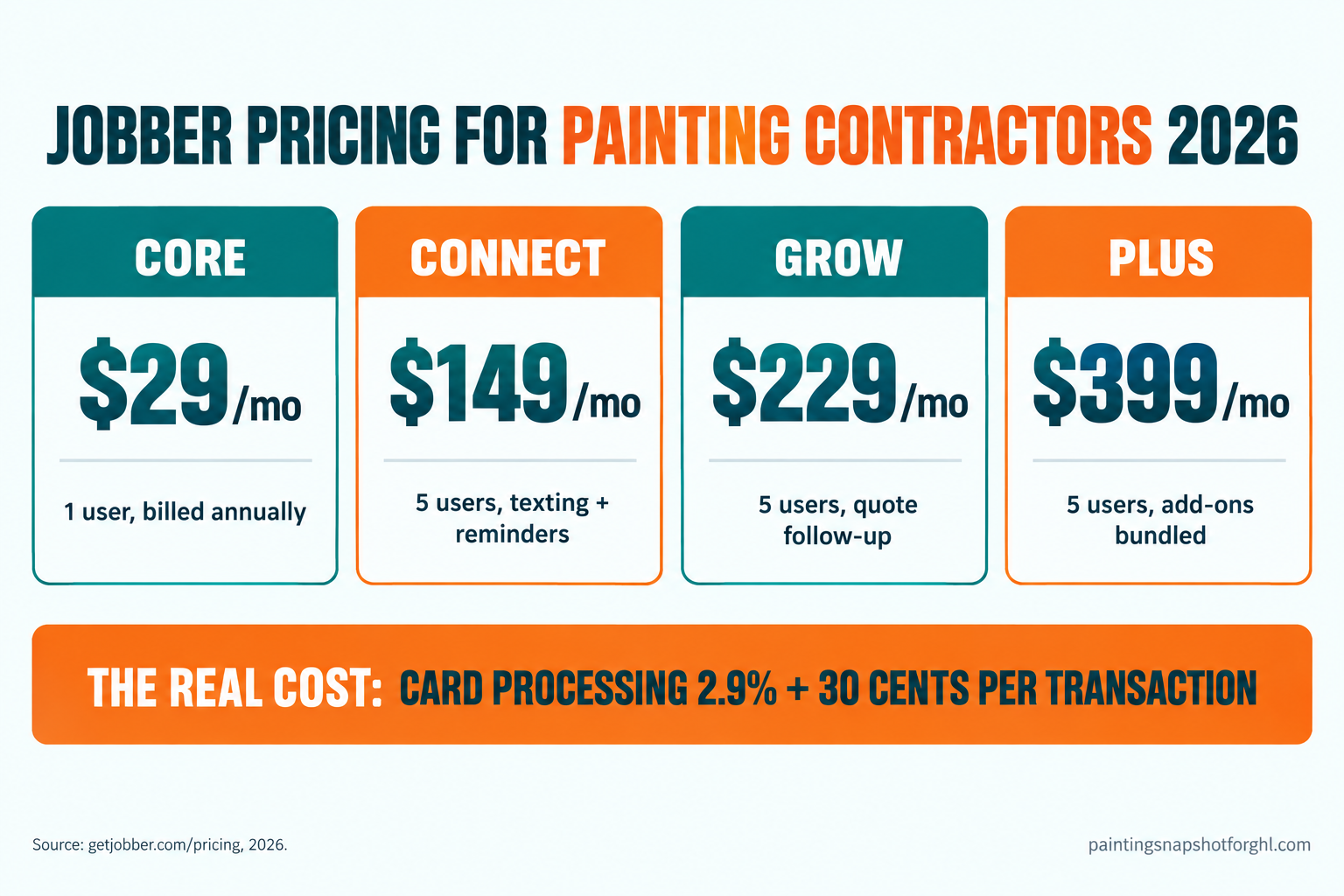
Jobber sells four plans, and the price depends on how many users you put on it. The figures below are billed annually, the cheapest way to buy; month-to-month runs higher (Jobber pricing).
| Plan | Annual price (5 users) | What you get | Who it actually fits |
|---|---|---|---|
| Core | $29/mo (1 user only) | Quoting, scheduling, invoicing, basic payments | A true solo painter who does not need client texting or automation |
| Connect | $149/mo | Core plus client texting, automated reminders, online booking, QuickBooks sync | A solo or small crew that wants the reminders and texting to run on their own |
| Grow | $229/mo | Connect plus quote follow-ups, optional line items, job costing, two-way texting | A growing shop that wants the software to chase quotes and track job margin |
| Plus | $399/mo | Grow plus the Marketing Suite, AI Receptionist, and Pipeline bundled in | A multi-crew shop that wants the paid add-ons without buying them separately |
A few things jump out. Core is a trap for most painting shops: no client texting and no automated reminders, the single most useful things field software does for a painter. Connect is the real starting point for a one or two-truck shop. Grow adds quote follow-up and job costing, the stuff that protects your margin. Plus mostly bundles add-ons you would otherwise buy on top.
Here is the base plan price by tier for a five-person crew.
Figure: Jobber plan price for a 5-user painting crew (billed annually, USD per month).
Source: Jobber pricing page, 2026, annual billing. Core is one user; Connect, Grow, and Plus shown at the five-user tier.
The jump from Core to Connect is the big one, and almost every painting shop has to make it. That alone takes you from $29 to $149 a month before a single card is swiped.
The fees the plan price leaves out
Now the part the big friendly type leaves out. Three costs ride on top of your plan, and for a painting shop one is usually bigger than the subscription itself.
Card processing. Jobber Payments takes 2.9% plus 30 cents on every card, 2.7% plus 30 cents on tap-to-pay, and 1% on bank (ACH) payments (Jobber pricing). That sounds small until you run the math. A shop collecting $600,000 a year by card pays roughly $17,400 in processing alone, more than ten times a Grow subscription. Even a smaller shop at $200,000 is near $6,000. ACH at 1% is far cheaper, so pushing customers toward bank payments is one of the few real levers you have.
Extra seats. Every user past your plan’s cap is $29 a month (Jobber pricing). Your estimator, office person, and three painters fit a five-user plan. Add a sixth and it is another $29, every month.
Paid add-ons. The Marketing Suite is $99 a month, the AI Receptionist is $29, and Pipeline is $49, each on top of your plan unless you are on Plus, which bundles them (Jobber pricing). None are required, but the upsells are right there.
This next chart is the one most painters have never seen laid out: subscription versus card processing for a five-person crew on $600,000 of card revenue. The subscription is the short bar.
Figure: Jobber subscription vs card processing for a 5-person crew (estimated monthly, USD).
Source: subscription from the Jobber pricing page, 2026 (Grow, 5 users, annual). Processing estimated at 2.9% + 30¢ on ~$600,000 of annual card volume, shown monthly; your figure depends on your card vs ACH mix.
The lesson is not that Jobber is expensive software. By subscription it is reasonable. It is that for a painting business the processing fee is the real line item, and you cut it by moving work to ACH.
Three real cost scenarios: solo, crew, multi-crew
What Jobber costs you depends entirely on your size and card volume. Here are three shops.
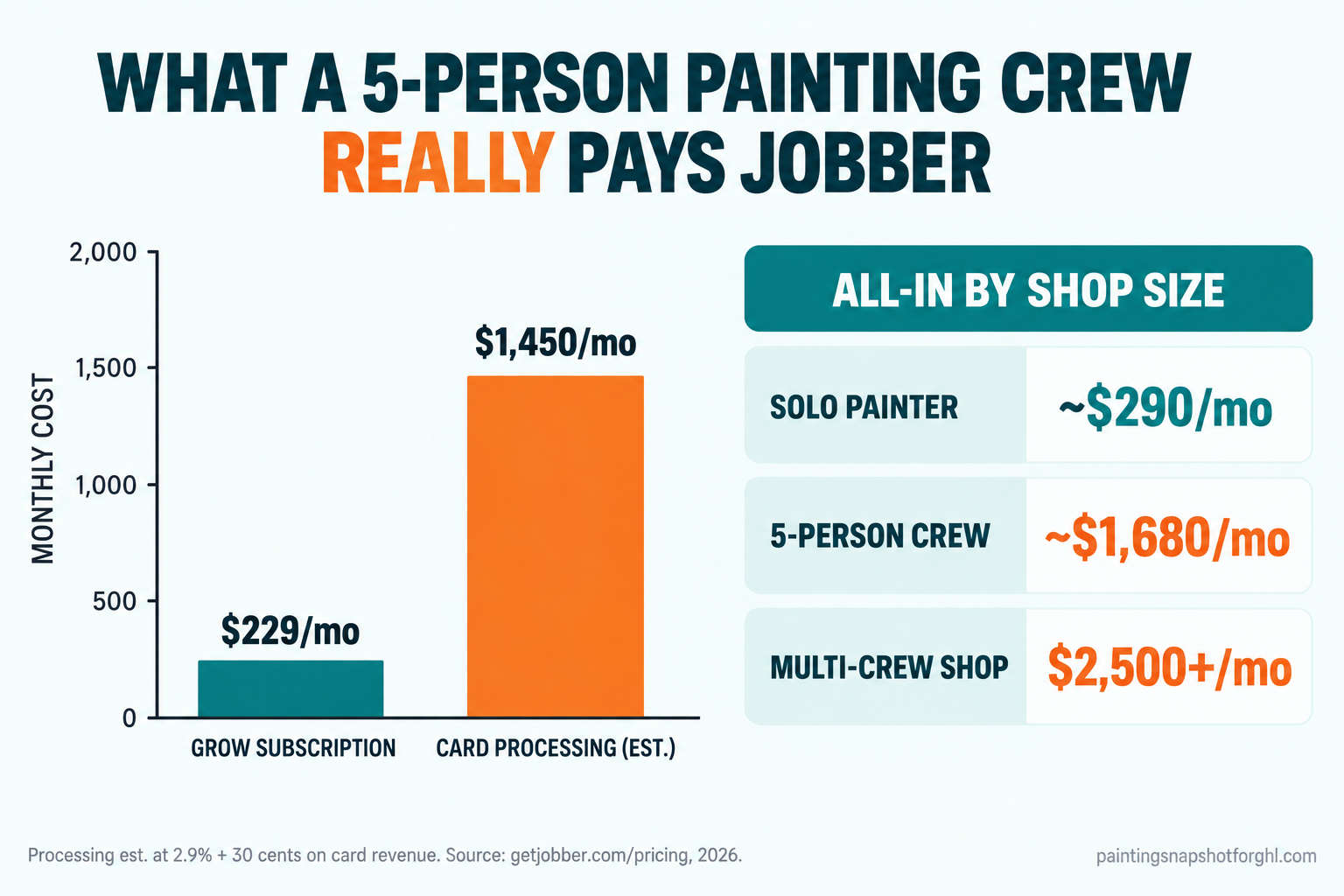
The solo painter. One truck, maybe a helper, $150,000 a year. You do not need five seats, but you need texting and reminders, so Core at $29 does not cut it and Connect at $99 for a single user does. If half your revenue runs through cards ($75,000), processing is roughly $2,300 a year, about $190 a month. All-in near $290, and the $99 plan is barely a third of it. Collect deposits by ACH or check and keep card volume low.
The five-person crew. An estimator, an office person, three painters, $600,000 a year. You want Grow at $229 for the quote follow-up and job costing, and five seats are included. But $600,000 of card revenue is roughly $17,400 a year in processing, about $1,450 a month. All-in near $1,680, and the subscription is only $229 of it. This is the shop that gets the biggest shock: the sticker said $229, the bill says four figures. Routing even a third of that to ACH saves over $5,000 a year.
The multi-crew shop. Three crews, 12 users, $1.5 million. On Grow or Plus with seat overages, call it $399 to $529 a month. Card processing on $1.5 million, even with a good ACH mix, can clear $30,000 a year. At this scale the subscription is a rounding error and the processing is a real cost center worth negotiating. Jobber is built for an operation this size and handles the scheduling and invoicing well. Just do not pretend the plan price is the cost.
The pattern: the bigger you are, the more the card fee dwarfs the subscription. Either way, the headline number is the least important part of the decision.
Where the Jobber bill bites painting shops
Software rarely fails you on the day you buy it. It fails three months in, when an unplanned cost shows up. Four spots where Jobber surprises painting contractors, and what to do.
You buy Core and outgrow it in weeks. Core has no texting and no automated reminders, which for a painter is the whole point of the software. You upgrade to Connect fast, so just start there. Size to the features you need, not the lowest sticker.
The card fee creeps because everything defaults to card. Jobber makes paying by card easy, good for getting paid and bad for your margin. Set ACH as the default on larger invoices and reserve cards for deposits and small balances.
Seat creep. A seasonal painter, then a second estimator, each another $29 a month you forgot to budget. Review seats every quarter and pull access from anyone who left.
The annual lock-in starts on day one. Annual billing is cheaper, but you commit for a year immediately. Run month-to-month first, confirm your crew uses it, then switch to annual once it sticks.
Steal this: the questions to ask and the follow-up no CRM runs
Two things to take with you: the questions that keep the real cost from sneaking up on you, and the follow-up copy that wins jobs, which Jobber and every CRM leaves for you to run by hand.
Price it honestly before you commit. Answer these for your own shop:
1. Which plan tier do I need for the FEATURES (texting,
   reminders, quote follow-up), not the lowest price?
2. How many seats do I need, and how many are included
   before the $29-per-user overage kicks in?
3. What is my annual card volume, and what is 2.9% + 30¢
   of the share I'll run through Jobber Payments?
4. How much of that can I move to ACH (1%) to cut the fee?
5. Do I actually need the Marketing Suite ($99), AI
   Receptionist ($29), or Pipeline ($49) add-ons?
6. Am I ready to commit annually, or should I run
   month-to-month first to be sure it fits?
Now the part no field-service CRM does for you: answering a brand-new lead in the first minute and chasing a quiet estimate for two weeks. Speed is the whole game: firms that answer within an hour are far more likely to reach the decision maker, and the painter who replies first usually books the job. Steal this copy.
The instant reply, sent within a minute of a new lead landing:
Hi [Name], this is [Your Name] with [Company]. Thanks for
the request for a [interior/exterior] painting estimate.
I can take a look this week. Does [day] morning or [day]
afternoon work better for a quick walk-through?
The follow-up on a quote that went quiet, day four:
Hi [Name], just following up on the painting estimate I
sent for [project]. Happy to walk through the scope or
adjust anything. Are you still looking to get this done
before [season/event]?
Jobber can store these as templates, but it will not fire them the instant a lead comes in or run the full two-week chase without you. That gap, between managing the work and winning it, is what a done-for-you automation system is built to close.
The rules Jobber doesn’t handle for you
Whatever software you pick, the rules on how you advertise, who you paint for, and how you text land on you, not the vendor. Three to keep straight.
EPA lead-paint RRP. Roughly three-quarters of homes built before 1978 still contain some lead-based paint, and work that disturbs it requires an EPA-certified renovator and lead-safe practices (EPA Renovation, Repair and Painting Program). No CRM makes you compliant.
State licensing and your ads. California requires a contractor license for most jobs over $1,000 and, under Business and Professions Code 7030.5, your license number must appear in all advertising (CSLB). Texas has no state-level general contractor license at all. If your marketing is templated across locations, that license-number rule is a real change to make. See the full compliance checklist for the state detail.
Texting law. Automated marketing texts need prior express written consent under the TCPA, and business texting now runs through A2P 10DLC registration (FCC). Build consent into your intake form and keep an opt-out on every message.
Straight answers to the objections
“I already pay for Jobber. Am I wasting money?” Not at all. Jobber is good at scheduling, invoicing, and collecting on work you already booked. The question is whether it is also winning you new work, and it is not built to. Keep it for operations and add something that answers leads and chases quotes.
“Isn’t $29 basically free? Why overthink it?” Because $29 is Core for one user with no texting, and almost no shop stays there. Once you add the tier you need, the seats, and the processing, the real number is several hundred to a few thousand a month. An hour of math now saves a surprise every month for a year.
“Should I just switch to Housecall Pro?” They are close competitors, and the Jobber vs Housecall Pro breakdown walks the differences. But switching CRMs does not fix the lead-response and follow-up gap, because neither answers a new caller in the first minute. Pick the operations tool you like and solve lead response separately.
“Do I need the paid add-ons?” Usually not at first. The Marketing Suite, AI Receptionist, and Pipeline are real tools, but they are a la carte for a reason. Start without them, find your actual bottleneck, and only add what earns its keep. The AI Receptionist at $29 is worth a look if you miss a lot of calls, but compare it against a system that also handles follow-up and reviews.
Frequently asked questions
How much does Jobber cost for a painting contractor in 2026?
Jobber publishes four plans, billed annually: Core at $29/mo for one user, Connect from $99, Grow from $149, and Plus from $399, with higher prices at larger user tiers. On top of that you pay 2.9% + 30¢ per card transaction, $29/mo for each user over your plan's cap, and optional add-ons. A realistic all-in for a five-person crew is around $230/mo in subscription plus well over $1,000/mo in card processing.
Is Jobber Core at $29 enough for a painting business?
For most shops, no. Core is a single user with no client texting, automated reminders, or online booking, which are the features that stop no-shows and chase quotes. Most painting contractors need at least Connect, so plan to start there rather than at the $29 sticker.
What are Jobber's card processing fees?
Jobber Payments charges 2.9% + 30¢ on cards, 2.7% + 30¢ on tap-to-pay, and 1% on bank (ACH) payments, plus 1% for instant payouts. For a painting shop collecting large deposits and final payments, this is usually the single biggest cost of using Jobber, so pushing larger invoices to ACH saves real money.
Does Jobber charge extra for additional users?
Yes. Each plan includes a set number of users, and every user beyond that cap is $29/mo. A five-user plan covers most small crews, but each seasonal painter or office person past the cap is another $29/mo, so review your seat count every quarter.
Will Jobber answer my leads and follow up on quotes automatically?
No. Jobber manages the work you already won: scheduling, invoicing, and collecting payment. It does not answer a brand-new lead in the first minute or run a multi-week chase on an unsold estimate on its own. That is marketing automation, a separate category, and where most painting revenue leaks. A done-for-you system built on GoHighLevel fills that gap and runs alongside Jobber.
Is Jobber or GoHighLevel better for a painting shop?
They solve different problems. Jobber is strong field-service operations software. GoHighLevel is a marketing and automation platform that answers leads, follows up, and harvests reviews. Many shops run both. See the GoHighLevel vs Jobber comparison for which your bottleneck calls for.
Related reading:
- Best Painting Business Software in 2026: Jobber vs Housecall Pro vs JobNimbus vs PaintScout vs Markate
- GoHighLevel vs Jobber for Painters: Which One Do You Actually Need?
- Jobber vs Housecall Pro for Painting Businesses (2026)
- JobNimbus Pricing for Painting Contractors: What It Actually Costs in 2026
- Painting Estimate Follow-Up: The Sequence That Turns Cold Quotes Into Booked Jobs
- Painting Contractor Compliance in 2026: Licensing, EPA Lead Rules, and Texting Laws
Painting Snapshot is a GoHighLevel automation product for house painting contractors. We are not a painting company and do not perform painting work or quote project pricing. Pricing, plans, and features for Jobber, Housecall Pro, JobNimbus, PaintScout, and Markate are set by those companies and change over time; the Jobber figures here reflect publicly published 2026 pricing and are provided for planning only. All product names are trademarks of their respective owners and are not affiliated with Painting Snapshot. Verify current terms on each vendor’s site before buying.