If your Chicago painting company is running on a patchwork of Jobber, a spreadsheet, a separate texting app, and a shoebox of business cards, migrating to GoHighLevel is how you finally consolidate — but only if you move the data in the right order so nothing gets lost. The migration itself is not the hard part; the risk is a botched cutover that scrambles your contacts, drops job history, or breaks the automations that were booking estimates. This playbook walks you through the exact 7 steps to migrate a painting business to GoHighLevel cleanly in 2026 — what to audit first, how to map your pipeline, how to export and import without data loss, and how to test before you cancel a single old subscription.

In this post
- Why Chicago painting shops are moving to GoHighLevel
- Before you migrate: what usually goes wrong
- The 7-step GoHighLevel migration playbook
- DIY vs done-for-you migration
- Frequently asked questions
Why Chicago painting shops are moving to GoHighLevel
Chicago is one of the most competitive home-services markets in the country. The metro is the third-largest in the US, home to roughly 9.4 million people, and the city itself holds about 2.7 million residents (U.S. Census 2024 estimates, via Chicago Tribune). With a citywide homeownership rate near 46% (Census ACS via Data USA) and harsh winters that push interior repaints, cabinet refinishing, and spring/summer exterior work into tight seasonal windows, demand is steady — and so is the competition chasing it. The Bureau of Labor Statistics counted 6,630 painters employed across Illinois, about 5,430 of them in the Chicago metro (BLS OEWS, May 2022).
That competition is exactly why a scattered toolset quietly costs you jobs. When a Lincoln Park homeowner requests three estimates on a Tuesday night, the painter whose system responds first usually wins. If your leads live in one app, your texts in another, and your job history in a spreadsheet, there’s no single place where “a new lead came in, respond now” actually fires. GoHighLevel consolidates all of it — CRM, texting, email, calendars, reviews, and automations — into one account, which is why so many Chicago shops are migrating. According to HighLevel, the platform now serves over a million businesses and landed at #426 on the Inc. 5000 in 2024 (HighLevel).
How US small businesses without a CRM operate (share of the 56% that have none). Migrating to GoHighLevel is how a painting shop leaves this group. Source: Zoho, 2023 State of Customer Operations for U.S. Small Businesses.
The upside of consolidation isn’t abstract. Speed-to-lead is where painting jobs are won and lost, and it’s exactly what a fragmented stack breaks. The classic Harvard Business Review analysis found companies that contacted a web lead within an hour were about 7× more likely to qualify it than those who waited even an hour longer — and 60× more likely than firms that waited 24+ hours (HBR, 2011). The separate MIT/InsideSales lead-response study pushed it further: responding within 5 minutes made a lead about 21× more likely to qualify than waiting 30 minutes (Lead Response Management study, MIT/InsideSales). You can’t hit those windows when your tools don’t talk to each other. (For the follow-up half of that equation, see our guide to missed-call text-back for painters.)
Before you migrate: what usually goes wrong
A GoHighLevel migration goes sideways for predictable reasons, and every one of them is preventable with sequencing. Bloor Research’s analysis of data-migration projects found roughly 75% run over budget or over schedule, with cost overruns averaging about 30% (Bloor Research, via Globema). The projects that fail almost always skipped a planning step to “just get it moved.”
The playbook below is ordered specifically to avoid all four. Do the steps in sequence and the migration is boring — which, for a data migration, is exactly what you want.
The 7-step GoHighLevel migration playbook
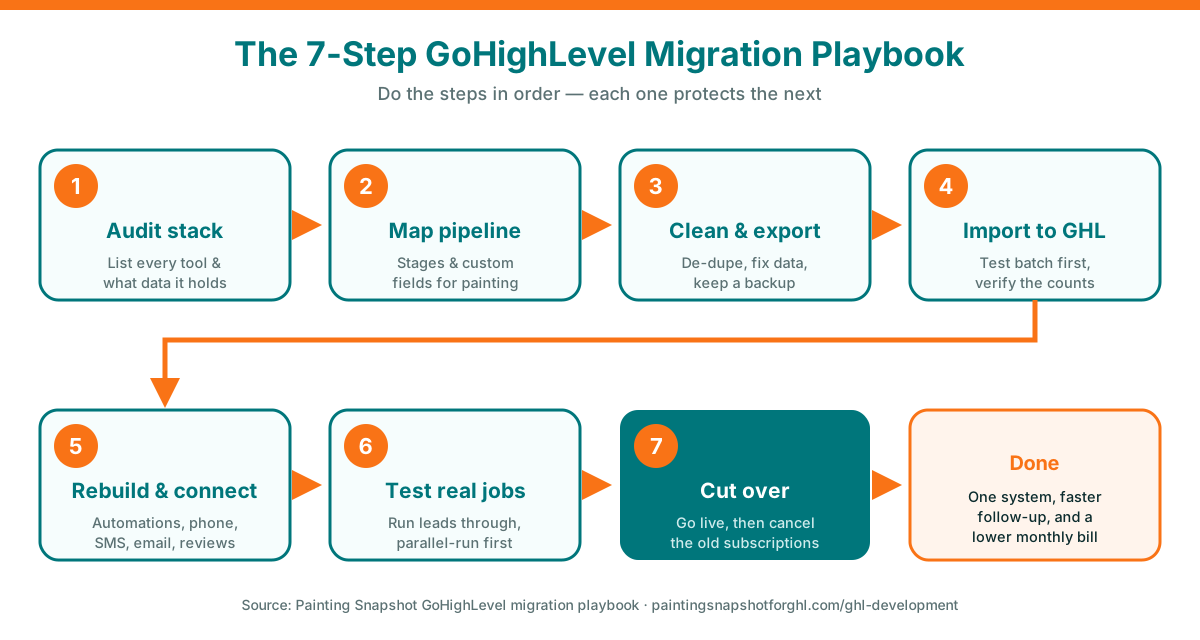
The migration in order: audit, map, clean, import, rebuild, test, cut over. Each step protects the one after it — which is how you stay out of the 75% of migrations that overrun.
Step 1: Audit your current stack
You can’t move what you haven’t inventoried. Before you touch GoHighLevel, list every tool that holds a piece of your painting business and what lives in each: contacts and lead sources, job/estimate history, invoices and payment status, your calendar, review requests, and any text or email conversation history. For most Chicago shops that means some mix of Jobber, Housecall Pro, PaintScout, Markate, Estimate Rocket, QuickBooks, a Google Sheet, and a personal cell phone full of texts.
For each tool, note two things: can it export (CSV or API), and what would you lose if it couldn’t. That second question tells you where to spend your care. Contacts and job history almost always export cleanly; years of SMS threads on a personal phone usually don’t, so you plan to preserve those differently (screenshots, or simply starting fresh in GHL). This audit is also where the “why am I paying for all this?” moment lands — Gartner estimates about 25% of SaaS subscriptions go unused or underutilized (Gartner, via LicenseLogic), and consolidation is half the reason you’re migrating.
Step 2: Map your painting pipeline
This is the step DIY migrations skip and later regret. Before importing anything, define how a job actually flows through your business as pipeline stages in GoHighLevel — for a painting shop that’s usually something like: New Lead → Estimate Scheduled → Estimate Sent → Follow-Up → Won → Job Scheduled → In Progress → Complete → Review Requested. Then define the custom fields you need on every contact: service type (interior, exterior, cabinet, commercial, deck/fence), square footage or room count, coating spec, property type, and lead source.
Map your old data to this structure on paper first. Where did “job status” live in Jobber, and which GHL stage does it become? What was a “customer type” tag becomes which custom field? Getting this mapping right before import is the single biggest factor in a clean migration — it’s why our done-for-you GHL builds start with an audit-and-map phase before any data moves. If you want a reference for how a painting pipeline should be structured, our comparison of GoHighLevel vs Jobber for painters breaks down the stages in detail.
Step 3: Clean and export your data
Now export — but clean as you go, because whatever you import is what you live with. Pull your contacts, job history, and invoices out of each tool as CSV (or via API for larger datasets). Then, in a spreadsheet, do the unglamorous work: de-duplicate contacts, remove disconnected numbers and dead emails, standardize formatting (phone numbers, addresses, service tags), and fill the fields you defined in Step 2. A homeowner who’s both in Jobber and your Google Sheet should end up as one record, not two.
Step 4: Import into GoHighLevel
With clean, mapped data, the import itself is straightforward. In GoHighLevel, import contacts by CSV and match each column to the custom fields and tags you created in Step 2 — service type, square footage, lead source, and a tag for their current pipeline stage so you can bulk-move them onto the pipeline after import. Start with a small test batch (20–50 contacts) and verify the fields landed correctly before importing the full list. Larger or more complex datasets — thousands of contacts with linked job history and invoices — are usually moved via the API rather than plain CSV, which is where a developer earns their fee by preserving the relationships between records.
Once contacts are in and tagged, place them onto the pipeline stages, and confirm counts match your source. If you had 6,400 active homeowners in Housecall Pro, you should see 6,400 in GHL — not 6,180 because a batch silently failed.
Step 5: Rebuild automations and connect channels
Contacts sitting in a CRM don’t book jobs — automations do. This is where you rebuild the follow-up that was scattered across your old tools into GHL’s workflow engine, and connect your communication channels: your business phone number (port it or provision a new one), SMS, email, Google Business Profile, and Facebook/Instagram if you use them. At minimum, a painting shop should stand up:
- Instant lead response — the moment a lead comes in from any source, an automated text/email goes out in seconds, and missed calls trigger an automatic text-back. This is the speed-to-lead advantage the whole migration was for. (See our AI Caller and AI Chatbot modules for how the answering itself gets automated.)
- Estimate follow-up — a sequence that nudges homeowners who got a quote but haven’t booked, over days and weeks. Most painting revenue is lost here; our painting estimate follow-up guide covers the cadence.
- Review harvesting — after a job is marked complete, an automatic request asks for a Google review, routing unhappy customers to you privately first. See review harvesting automation.
This is the highest-value step and the one most DIY migrations under-build. If you’d rather not reconstruct 50 workflows by hand, this is the core of what our GoHighLevel development team ships pre-built and branded to your shop.
Step 6: Test against real jobs
Do not go live on faith. Before cutover, run real scenarios through the new system while the old one is still running in parallel. Submit a test lead through your website form and confirm the instant-response text fires. Push a test contact through every pipeline stage and watch the automations trigger. Book a test appointment and verify the confirmation and reminder sequence. Mark a test job complete and confirm the review request goes out. Check that your imported contacts show the right custom fields and history.
Running the old and new systems side by side for a few days is cheap insurance — it means any gap surfaces while you still have the original data live, not after you’ve canceled it. This parallel-run-then-verify approach is exactly why professional migrations verify data against a real sub-account before cutover.
Step 7: Cut over and cancel the old tools
Only when the tests pass do you cut over: point all new leads at GoHighLevel, finalize your phone number port, and make GHL the single source of truth your team works from. Give it a week of live use with the old tools in read-only reach, then — once you’re confident nothing is missing — cancel the duplicate subscriptions you’ve now outgrown. That’s the payoff moment: one system instead of five, one login for your crew, and the monthly SaaS bill finally going down instead of up.
DIY vs done-for-you migration
You can absolutely run this playbook yourself, and if you’ve got a slow week, a clean dataset, and the patience to learn GHL’s workflow builder, DIY keeps cash in your pocket. The honest trade-off is time and risk. A hands-on owner migrating a modest dataset can do it over a couple of focused weekends; a shop with thousands of contacts, linked invoices, and complex automations is where the 75% overrun rate (Bloor) bites, and where a botched import can lose history you can’t recover.
| Migration factor | DIY (you run the playbook) | Done-for-you (our GHL team) |
|---|---|---|
| Your time | Several weekends, plus learning GHL | Minutes — an audit call, then hands-off |
| Data mapping | You map every field by hand | We map contacts, history, pipelines, invoices |
| Large / linked datasets | CSV limits; relationships can break | API migration preserves record links |
| Automations rebuilt | You build every workflow | 50+ workflows shipped pre-built & branded |
| Verification | Self-checked | Verified against your real account before cutover |
| Typical timeline | Variable — weeks to months | ~2–5 weeks depending on data volume |
| Data & code ownership | Yours | Yours — full IP transfer + 30-day warranty |
Done-for-you details reflect current published terms on our GHL development & migration page; timelines depend on data volume.
For a lot of established Chicago painting shops, the math favors done-for-you not because DIY can’t work, but because the owner’s weekends are worth more than the fee — and a clean, verified cutover protects years of customer history. Whichever path you choose, the sequence is the same: audit, map, clean, import, rebuild, test, cut over.
The return on getting this right compounds. CRM has paid back multiples on every dollar for years — Nucleus Research measured $5.60 per $1 in 2011, $8.71 in 2014, and an updated $3.10 more recently as the market matured (Nucleus Research). For a painting shop, that return shows up as faster lead response, fewer estimates falling through the cracks, and more finished jobs turning into reviews — all from one system instead of five.
Reported CRM return per $1 spent over time (USD). The figure has declined as the software market matured, but stays well above breakeven. Source: Nucleus Research.
If you’re weighing whether to run GHL yourself at all after migrating, our post on the real cost of running GoHighLevel yourself and the GoHighLevel AI Employee for painters breakdown are worth a read. And if you want the whole system pre-built rather than migrated piece by piece, the done-for-you painting snapshot installs the full automation stack in about 24 hours.
Frequently asked questions
How long does it take to migrate a painting business to GoHighLevel?
A DIY migration of a modest, clean dataset can be done over a couple of focused weekends. A larger shop with thousands of contacts, linked job history, and complex automations takes longer. A professional done-for-you migration typically runs 2–5 weeks depending on data volume, because the data is mapped, migrated via API to preserve record relationships, and verified against your real account before cutover.
Will I lose my data or job history when I move to GoHighLevel?
Not if you sequence it correctly. The key is to keep an untouched backup of every raw export, import a small test batch first, verify counts and fields, and run the old and new systems in parallel until you've confirmed nothing is missing — only then cancel the old tool. Contacts, job history, and invoices almost always export and import cleanly; long personal-phone SMS threads are the main thing that doesn't migrate easily and is usually started fresh in GHL.
Can I migrate off Jobber, Housecall Pro, or PaintScout into GoHighLevel?
Yes. Those are among the most common source platforms. You export contacts, job history, and invoices (via CSV or API), map them to a GoHighLevel pipeline and custom fields built for painting, import and verify, then rebuild your automations. Larger datasets with linked records are best moved via API. Our GHL development team runs full migrations off these platforms and verifies the data before you cut over.
Why do so many data migrations fail?
Almost always because a planning step got skipped to 'just get it moved.' Analyst firm Bloor Research found roughly 75% of data-migration projects run over budget or schedule, with cost overruns averaging about 30%. The common mistakes are exporting before cleaning, importing before mapping the pipeline, forgetting to rebuild the automations, and canceling the old tool before verifying the new one. Sequencing the migration correctly avoids all four.
Is GoHighLevel worth switching to for a painting contractor?
For most shops running a patchwork of tools, yes — because it consolidates CRM, texting, email, calendars, reviews, and automations into one system, which is what makes instant lead response possible. Speed-to-lead is decisive: contacting a web lead within an hour makes it about 7× more likely to qualify (HBR), and within 5 minutes about 21× more likely (MIT/InsideSales). CRM has also historically returned multiples per dollar spent (Nucleus Research). The value comes from the consolidation and faster follow-up, not the software alone.
Should I migrate myself or hire someone?
DIY works if you have time, a clean dataset, and patience to learn GHL's workflow builder — and it keeps cash in your pocket. Done-for-you makes sense when your dataset is large or linked, your weekends are worth more than the fee, or you can't afford to lose customer history to a botched import. A professional migration maps and verifies your data and rebuilds your automations, with full data/code ownership and a warranty. See our GHL development and migration page for a scoped quote.
Travis is a recovering project manager who ran scheduling for a commercial and HOA painting outfit before moving into systems consulting. He is the person crews call when the pipeline is a mess of sticky notes and missed reminders. He maps the messy real-world back office of a painting business into clean GoHighLevel workflows, and he writes about migrations, appointments, no-show recovery, and the unglamorous automations that quietly save the most money.
Related posts
- GoHighLevel vs Jobber for Painters: Which CRM Actually Books More Jobs?
- The Real Cost of Running GoHighLevel Yourself: Why Painting Contractors Hire a GHL VA
- The GoHighLevel AI Employee for Painters: What It Does and What It Costs
- Missed-Call Text-Back for Painters: Never Lose a Lead to Voicemail
- Painting Estimate Follow-Up: The Sequence That Wins Back Lost Quotes
Painting Snapshot builds done-for-you GoHighLevel automation systems, custom GHL development and migrations, fast Astro websites, and social media content for house painting contractors. We are not a painting company and do not perform painting work or quote project pricing. The industry, market, migration, CRM ROI, lead-response, and Chicago figures above are drawn from the cited third-party sources (IBISWorld, U.S. Census, BLS, Bloor Research, Gartner, Nucleus Research, Zoho, HBR, MIT/InsideSales, HighLevel) and reflect general benchmarks, not a guarantee of results for any specific painting business. Service scope, timelines, and pricing reflect current published terms and may change — verify on our GHL development and pricing pages.