It is Tuesday and you are on a ladder cutting in a ceiling line. In the last three hours a homeowner filled out the quote form on your website, someone messaged your Facebook page about cabinets, an Angi lead pinged your email, and your cell buzzed twice with numbers you did not recognize. You will get to all of it tonight. By tonight, two of those four have booked the painter who called them back first, and one has cooled off enough that your reply reads like spam. You did not lose those jobs on price. You lost them because the leads were scattered across five places and nobody watched the door.
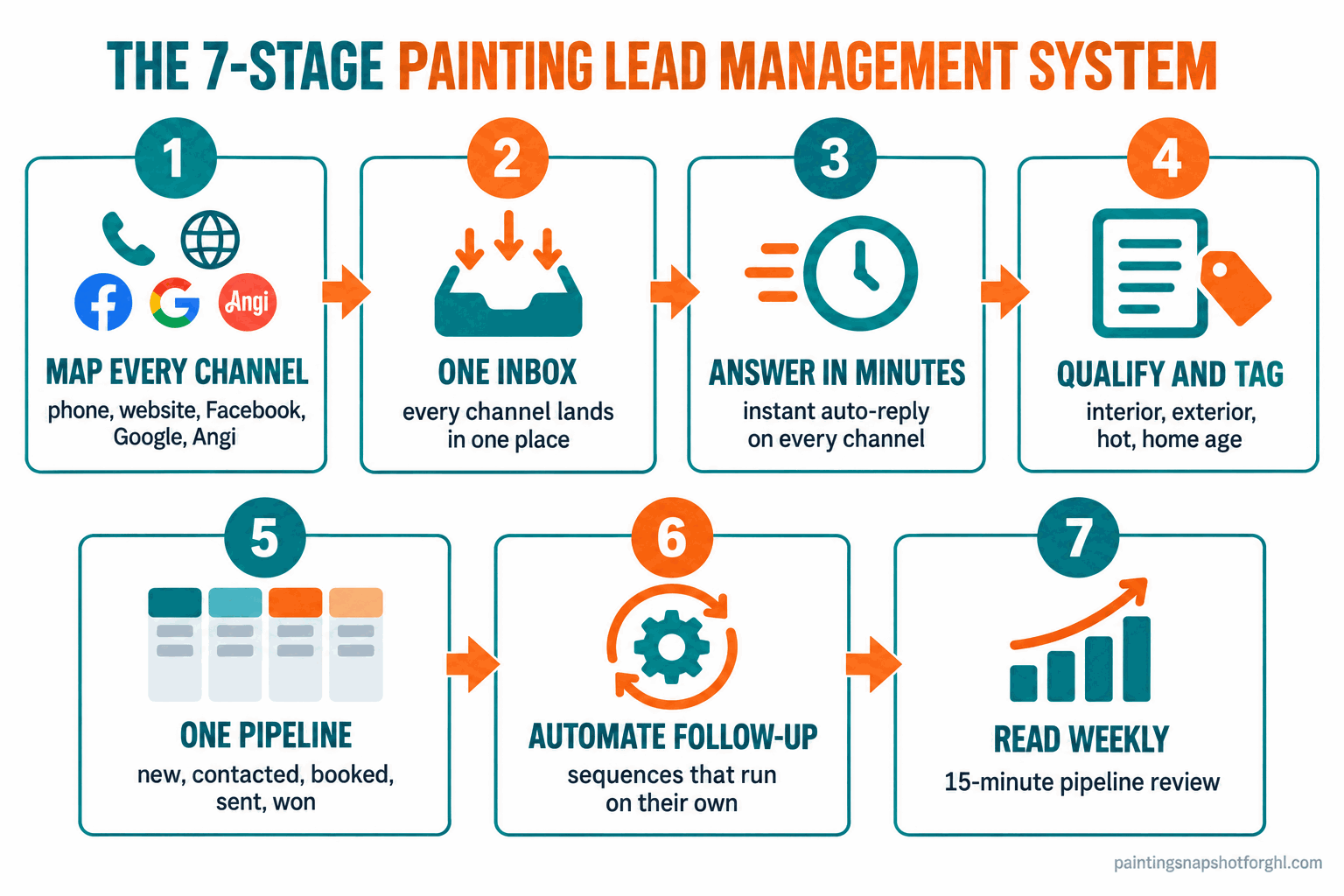
The fix is not working harder. It is a lead management system: one inbox that catches every channel, a first reply that goes out in minutes instead of hours, a simple pipeline so no lead is ever invisible, and automated follow-up that keeps working while you are on the brush. This post walks through the seven stages that make that happen, the exact auto-replies you can copy today, and the three rules that stop leads from dying in a tab you forgot to open.
In this post
- Why scattered leads quietly cost you jobs
- Stage 1: Map every door a lead can walk through
- Stage 2: Pull every channel into one inbox
- Stage 3: Answer in minutes, from one place
- Stage 4: Qualify and tag
- Stage 5: Put every lead on one pipeline
- Stage 6: Automate the follow-up
- Stage 7: Read the pipeline every week
- How it changes by shop size
- The compliance part you cannot skip
- Objections I hear every week
- Frequently asked questions
Why scattered leads quietly cost you jobs
A missed lead does not feel like much. One form, one text, one Facebook message. But add them up across a month and the scatter is the single biggest leak in a painting business.
Start with the money you already spent to get the lead. A shared lead from Angi or HomeAdvisor runs roughly $30 to $80, and because it sells to several pros at once, the real cost of a booked job climbs fast once you count the leads that never sign (HomeAdvisor pro pricing). A Thumbtack painting lead is shared with four or five pros at $20 to $45 each (Thumbtack lead cost). Every lead you let sit is money burned, handed to the painter who answered first.
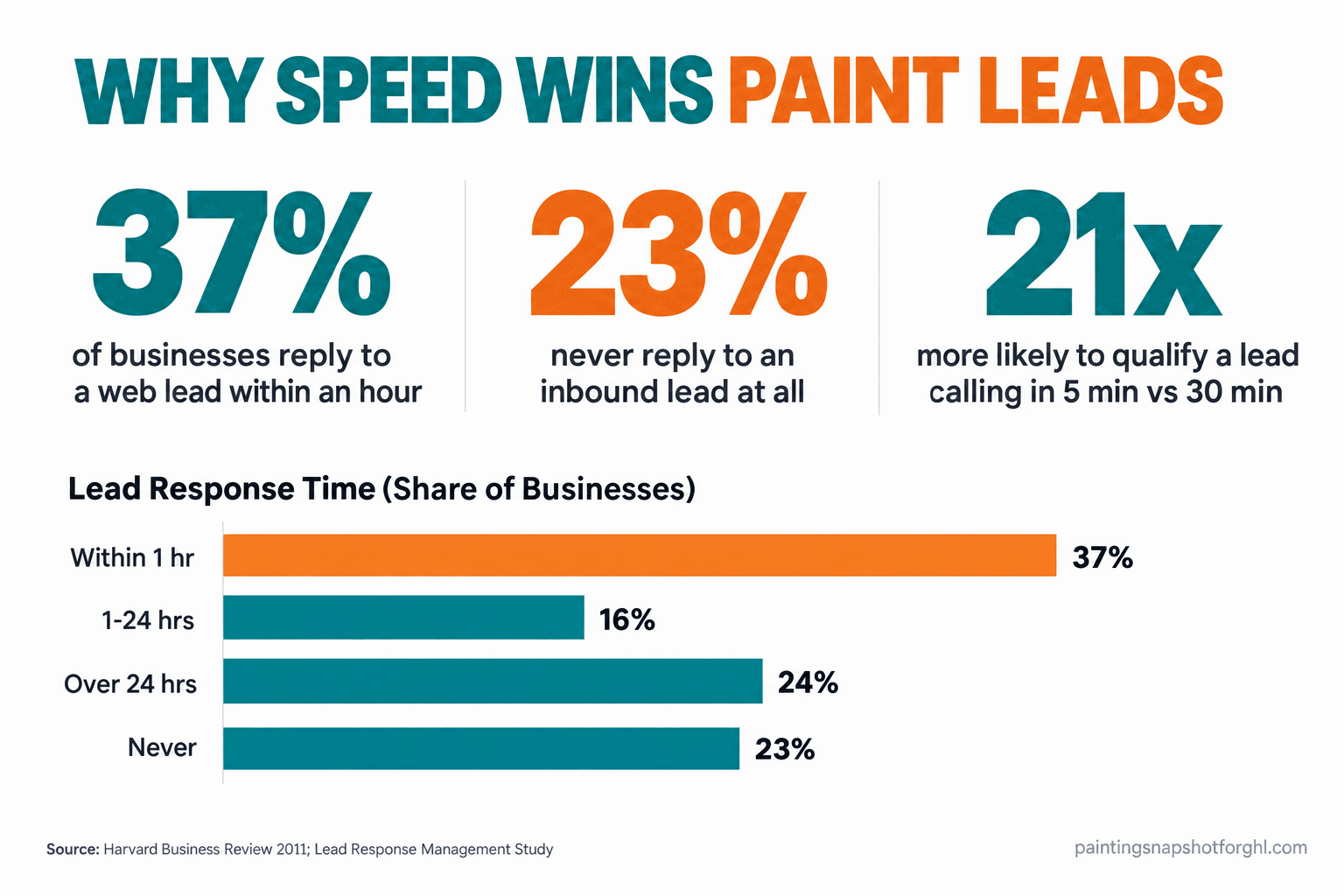
Then there is the speed problem. In a Harvard Business Review study of 2,241 U.S. companies, only 37% responded to a web lead within an hour and 23% never responded at all, and reps who reached a lead within that first hour were about seven times more likely to have a qualifying conversation (Harvard Business Review, 2011). The Lead Response Management Study of more than 15,000 leads found that calling within five minutes instead of thirty made you roughly 21 times more likely to qualify the lead (Lead Response Management Study). A homeowner who just filled out a form has their phone in hand. Thirty minutes later they have messaged two other painters.
How fast U.S. businesses respond to a web lead: only 37% reply within the first hour and 23% never reply at all. Source: Harvard Business Review, 2011.
The scatter and the speed problem feed each other: you cannot answer in five minutes if you do not even know a lead came in. Fix the scatter first and the speed follows. That is the job of the system below.
Stage 1: Map every door a lead can walk through
Before you can catch every lead, you have to know every place one can show up. Most painters have never written this down, which is exactly why leads go missing. List every door:
- Your business phone, including missed calls and voicemails
- Your website quote form and website chat
- Facebook page messages and Facebook lead ads
- Instagram DMs and comments
- Your Google Business Profile (people message and call straight from search)
- Lead platforms like Angi, Thumbtack, and HomeAdvisor
- Email, including the address on your truck
- Texts and calls to your personal cell, the ones referrals use
Most shops count five to eight live doors, and every door you do not actively watch is one leads walk out of. The painter who went solo last year usually runs his whole lead flow through his personal cell and a Facebook page he checks at red lights, so half his channels have no owner.
How it breaks: You assume leads “mostly come from referrals and Google,” watch two doors, and ignore the rest. The Angi leads you pay for pile up unread and the Instagram DMs never get a reply. You cannot manage what you have not listed.
Stage 2: Pull every channel into one inbox
Here is the core move: every channel from Stage 1 flows into one inbox. Not five apps and a notebook. One place where a Facebook message, a website chat, a text, a Google message, and a form fill all land as conversations you answer side by side.
This is what a shared inbox or conversations tool does, and it is the backbone of every real CRM built for home-service work. A homeowner’s Facebook message shows up in the same inbox as the text they send an hour later, tied to the same person, so you are not running three half-conversations across three apps. You reply once, from one screen, and it goes back out the channel they used. Instead of checking Facebook, then email, then texts, then the Angi app, you work one inbox top to bottom.
How it breaks: You keep the channels separate “because that is how they came.” The same homeowner texts and also messages Facebook, you answer the text, never see the Facebook message, and look like you ignored them. One inbox is also what makes missed call text back work, firing the auto-text the second a call goes unanswered.
Stage 3: Answer in minutes, from one place
Once everything lands in one inbox, speed stops being a heroic effort and becomes a setting. You cannot reply in five minutes while you are spraying a cabinet door, but your system can send the first touch instantly, on every channel. That automatic reply tells the homeowner a real person is on it, buys you time to call back, and starts the conversation while their intent is still hot.
The trick is that it is not a generic “thanks, we got your message.” It confirms you paint, asks the question that moves things forward, and sets up the callback. Here is copy for each door.
How it breaks: The first reply depends on you being free, so it goes out “when I get a sec,” which on a paint day means 9pm, and by then the homeowner has three other quotes moving. Make the first touch instant, specific, and a question. For the deeper version, see the real cost of a slow quote response and how to stop losing leads after hours.
Stage 4: Qualify and tag so you know what you are holding
Not every lead is a job, and not every job is one you want. Once a lead is in the inbox, you need to know at a glance what it is: interior or exterior, a hot “we want to start in two weeks” or a tire-kicker pricing a someday project. That is what tagging does. A tag is a label on the contact that makes a pile of messages sortable.
Keep your tags simple enough that you will actually use them. Service type (interior, exterior, cabinets, commercial). Source (referral, Google, Facebook, Angi). Status (new, quoted, won, lost). Maybe a hot or warm flag. The homeowner’s answer to your first-touch question usually tags the lead: “the whole downstairs” is interior and probably hot.
The most important tag for a painter is home age, because any home built before 1978 drops you into EPA lead-paint rules. Capture it at intake so the tag exists before you schedule the job.
How it breaks: Every lead looks the same in the pile, so you re-read messages all evening to remember who wanted what, and the hot lead gets the same slow treatment as the someday project. Tags turn a lead pile into a lead list you can work in order, the groundwork for a real CRM pipeline.
Stage 5: Put every lead on one pipeline
A pipeline is a row of stages a lead moves through, so you see where every job is. For a painting shop it is simple:
- New lead (just came in, first touch sent)
- Contacted (talked, qualified, trying to book the estimate)
- Estimate booked (appointment set)
- Estimate sent (quoted, waiting on a yes)
- Won or Lost
The power is not in the stages, it is that every lead sits in exactly one of them, visible, at all times. No lead is ever “somewhere in my texts.” You look at the board and instantly see the three leads stuck in “estimate sent” who need a follow-up and the one in “new” who has not been called. A pipeline turns “I think I have a few quotes out” into “I have four estimates sent worth $22,000 and two have gone quiet,” and it gives you real numbers on how many new leads become booked estimates and jobs.
How it breaks: You keep the pipeline in your head, which works at three leads and falls apart at thirty. Leads in “estimate sent” quietly age out because nothing shows they are sitting there. Five stages, updated as a habit, beats a fifteen-stage board nobody touches.
Stage 6: Automate the follow-up at each stage
Here is where most painters leave the most money on the floor. They answer a lead once or twice, and if the person goes quiet the lead dies. But a homeowner who went quiet is usually not a no, they are a “not right this second.” A short, automatic sequence tied to each stage where leads stall catches them for you.
- Stuck in “contacted”: three touches over four days mixing text and a call, then a monthly check-in so they stay warm.
- Stuck in “estimate booked”: confirmation plus reminders the day before and morning of, which is how you cut estimate no-shows.
- Stuck in “estimate sent”: the big one. The right multi-touch sequence turns cold quotes into booked work weeks later.
The sequence has to stop the instant they reply or book, or you will text a customer who already said yes. This one stage is where a lead management system pays for itself. The full playbook is in painting estimate follow-up.
How it breaks: Follow-up stays manual, so it depends on you remembering, which means it does not happen. Or you push too hard and it reads like collections. Automate it, keep it short, and always give the easy out.
Stage 7: Read the pipeline every week
A system you never look at drifts. Once a week, fifteen minutes, you read the board. It is the habit that keeps the whole thing honest.
That weekly read catches a leak in days instead of three months and twenty lost jobs later. It also turns lead data into decisions: if Facebook leads close at triple the rate of Angi leads, you know where next month’s money goes.
How it breaks: You build the system, then never open the board, so it rots back into a to-do list. Put the review on the calendar like a job.
How this changes for a solo painter, a 5-person crew, and a 3-crew shop
The seven stages are the same at every size. What you automate versus handle yourself shifts.
Solo painter or single crew. You are the estimator, the crew, and the phone, and leads die because you cannot answer while you are working. Automate the two stages that matter most first: one inbox (Stage 2) so nothing hides, and instant first-touch replies (Stage 3) so every lead gets caught the second it lands. That is the door watched while your hands are busy.
Five-person crew (one or two crews out daily). Now the leak is coordination, and it is easy to lose track of who talked to whom. This is where Stages 4, 5, and 6 earn their keep: tag so leads are not double-handled, run a real pipeline so you see every job at a glance, and turn on the follow-up so nothing depends on memory. At this size, one hot lead through the crack is a $5,000 job gone.
Three crews or more. Lead management is now a measurement problem, not just an admin one. Every stage runs automatically, and the weekly review (Stage 7) is your early-warning system: if “new” fills faster than “estimate booked,” your booking cannot keep up and you can hire before it costs you a month. At your volume, source tagging is budget strategy and the follow-up automation books work smaller shops let die.
Illustrative leads that slip through the cracks in a month without a single inbox and pipeline, by shop size. Your numbers depend on lead volume and how many doors you watch.
The compliance part you cannot skip
Automating your lead flow touches three rules, none hard to follow, all expensive to ignore.
Texting rules. Every automatic text here, the first-touch reply, the reminders, the follow-up sequence, falls under the TCPA, and business texting now runs through carrier registration called A2P 10DLC. In plain terms: get clear consent (the homeowner gave you their number for a quote), keep messages about their specific project, and give an easy opt-out (FCC on telemarketing and robocalls). Replies a homeowner expects are the safe zone. Blasting an old contact list is not.
Lead paint. This is why the home-age tag in Stage 4 matters. If you touch any home built before 1978, the EPA Renovation, Repair, and Painting rule requires you to be lead-safe certified, because roughly three-quarters of pre-1978 U.S. homes still contain some lead-based paint (EPA RRP for contractors). Flag home age at intake so you never book a job you are not certified to do.
License number in your marketing. A few states require your contractor license number in all advertising, and your automated replies and website count. California, for example, requires it under Business and Professions Code 7030.5 (CSLB). Put it in your templates once and it rides along on every message. For the full rundown, see our painting contractor compliance checklist.
Objections I hear every week
“I already pay for Jobber or Housecall Pro. Do I need something else?” Maybe not. Both are good at jobs, invoices, and scheduling. The question is whether they actually catch every channel and run your follow-up, or whether leads still come in through Facebook and your cell and live outside the tool. A lot of painters run a scheduling tool plus CompanyCam for job photos and still have no single inbox for incoming leads. If your tool does the inbox and the follow-up, turn those on. If not, that is the gap. We broke down the options in the best painting business software guide.
“I track my leads in my head and it’s fine.” It is fine at three leads. At thirty it is a sieve, and you never feel the leak because you never see the leads you lose. A pipeline makes the invisible visible, and most painters who put one in are shocked how many “I thought I followed up on that” jobs were sitting dead in their texts.
“Won’t customers hate the automated texts?” Only if they are generic and pushy. A fast, specific reply that answers their question and sets a callback reads as responsive, not robotic. Homeowners do not care whether a human or a system sent the first text. They care that someone replied in two minutes instead of two days.
“I’m not technical. This sounds like software homework.” Running it day to day is reading one inbox and dragging a lead to the next stage. The one-time setup is the only technical part, and you can do it yourself, hand it off, or buy it done for you.
Frequently asked questions
What is a lead management system for a painting contractor?
It is the setup that catches every incoming lead in one place, answers each one fast, and tracks it through to a won or lost job so none slip through. In practice that means one inbox for all your channels (phone, website, Facebook, Instagram, Google, Angi, email), an automatic first reply, simple tags, a five-stage pipeline, and automated follow-up. It replaces the scatter of five apps and a notebook with one system you actually watch.
How fast should a painter respond to a new lead?
As fast as possible, and ideally within five minutes. Harvard Business Review found reps who reach a web lead within an hour are about seven times more likely to have a qualifying conversation, and the Lead Response Management Study found calling within five minutes instead of thirty makes you roughly 21 times more likely to qualify the lead. An automatic first-touch reply lets you hit that speed on every channel even while you are on a job.
How do I keep track of leads from Angi, Facebook, Google, and my phone all at once?
Route them all into one shared inbox or CRM so every channel shows up as a conversation in one place, tied to the right person. Then put each lead on a simple pipeline so you always know its stage. Watching six separate apps is how leads go missing. One inbox plus one pipeline is how you stop the leak.
Do I need a CRM, or is a spreadsheet enough?
A spreadsheet beats nothing and is fine for a solo painter starting out. But a spreadsheet cannot catch a Facebook message, send an instant reply, or follow up on its own. Once you have more than a handful of leads a week across several channels, a CRM built for home-service work pays for itself by catching and following up on leads a spreadsheet would let die.
What are the pipeline stages for a painting business?
Keep it to five: new lead, contacted, estimate booked, estimate sent, and won or lost. The value is not in the stages, it is that every lead sits in exactly one of them at all times, so nothing is ever lost in your texts. Five stages you update as a habit beats a fifteen-stage board nobody touches.
Are automated lead-response texts legal?
Generally yes, when the homeowner gave you their number for a quote and the message is about their specific project. Business texting runs through A2P 10DLC carrier registration, so get clear consent, keep messages relevant, and include an easy opt-out. Transactional replies a customer is expecting are the safe zone. A few states also require your contractor license number in advertising, so put it in your templates.
Won't I lose the personal touch if I automate follow-up?
The personal touch is a fast, relevant reply and a real conversation, and automation protects that by making sure the first touch always happens and the follow-up never gets forgotten. You still handle the actual quote and the relationship. The system just makes sure you never miss the chance to start one.
Back to that Tuesday on the ladder. In the system version, all four leads hit one inbox the second they came in, and each got an instant, specific reply while you were still cutting in the ceiling. Two booked estimates before you climbed down, one got tagged for a callback, and the Angi lead you paid for did not rot unread. You did not work harder. You stopped leaving the doors unwatched, and the jobs you used to lose started closing.