

It is a Thursday afternoon and a homeowner is texting you that the trim “looks thin by the garage.” You painted that house five weeks ago. You know the crew did two coats, but all you have is a memory, and the three painters who were on it have painted eleven houses since. You scroll your camera roll. Nothing useful. Now you are driving across town to look at a wall you already got paid for, and you still cannot prove what you did. This is the hole CompanyCam fills, and it is why almost every painter already runs it alongside Jobber or Housecall Pro. So what does it cost in 2026, and is it worth it? The three tiers run about $63, $129, and $199 a month on annual billing, it is the best photo-documentation tool in the trade, and for most shops it is worth the money. But it is a camera and a filing cabinet, not a salesperson. It documents the jobs you already won, and it does nothing about the leads you are still losing.
In this post
- What a messy camera roll actually costs you
- Real 2026 CompanyCam pricing, tier by tier
- What CompanyCam actually does on a job site
- Three real scenarios: solo, five-person crew, big shop
- The one job it leaves you (and the copy to steal)
- Compliance a painting shop can’t skip
- Straight answers to the objections
- Frequently asked questions
What a messy camera roll actually costs you
The monthly bill is the small number. The big number is what happens when you cannot prove your work, and it shows up three ways.
First, callbacks and disputes. A homeowner claims you missed a spot or scratched the floor moving a dresser. With timestamped before-and-after photos you settle it in thirty seconds from your phone. Without them you eat a return trip, or worse, a chargeback. One avoided dispute a month pays for the subscription, and if a warranty or insurance claim ever lands, dated photos of prep, caulk, and coats are the difference between “we did it right” and “prove it.”
Second, marketing that never happens. Every painted room is a before-and-after that could win the next job, and most of it dies on three painters’ phones. The work is the best marketing you have, and an unorganized camera roll throws it away.
Third, the jobs themselves. There is no shortage of painting work: the Bureau of Labor Statistics counts about 326,900 painter jobs in 2025, a median wage of $49,400, and roughly 24,900 openings a year through 2035. The constraint is not demand. It is running the work cleanly enough to keep the reviews and referrals coming.
Real 2026 CompanyCam pricing, tier by tier
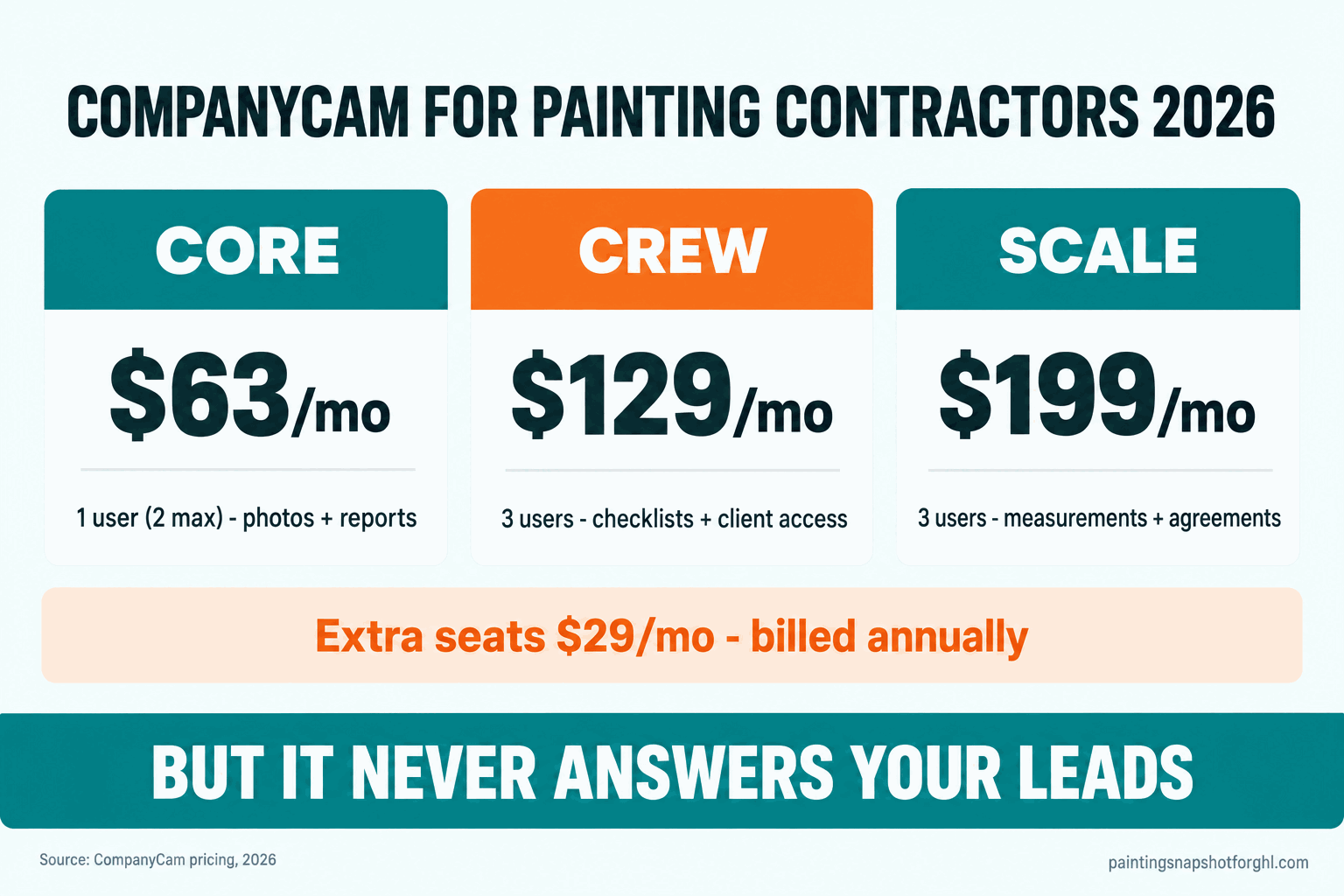
Here is what CompanyCam charges in 2026, straight from its own pricing page. The headline prices are billed annually; pay monthly and third-party trackers put the list closer to $79, $149, and $249 (Capterra).
- Core, about $63/mo. One user, capped at two. Timestamped photos and videos, auto-organized project history, reports built from job photos, on-site payment collection, offline capture that syncs later, and a basic price book with invoicing.
- Crew, about $129/mo. Three users. Adds real-time job tracking, standardized checklists, auto-generated reports, task assignment, a live map of your jobs, custom client access, and proposals built from voice notes and photos.
- Scale, about $199/mo. Three users. Adds unlimited workflow templates, a single view of every location, subcontractor access control, room measurement from the camera, and agreements you can send and get signed.
- Enterprise, custom. For fifty-plus users and multi-location shops.
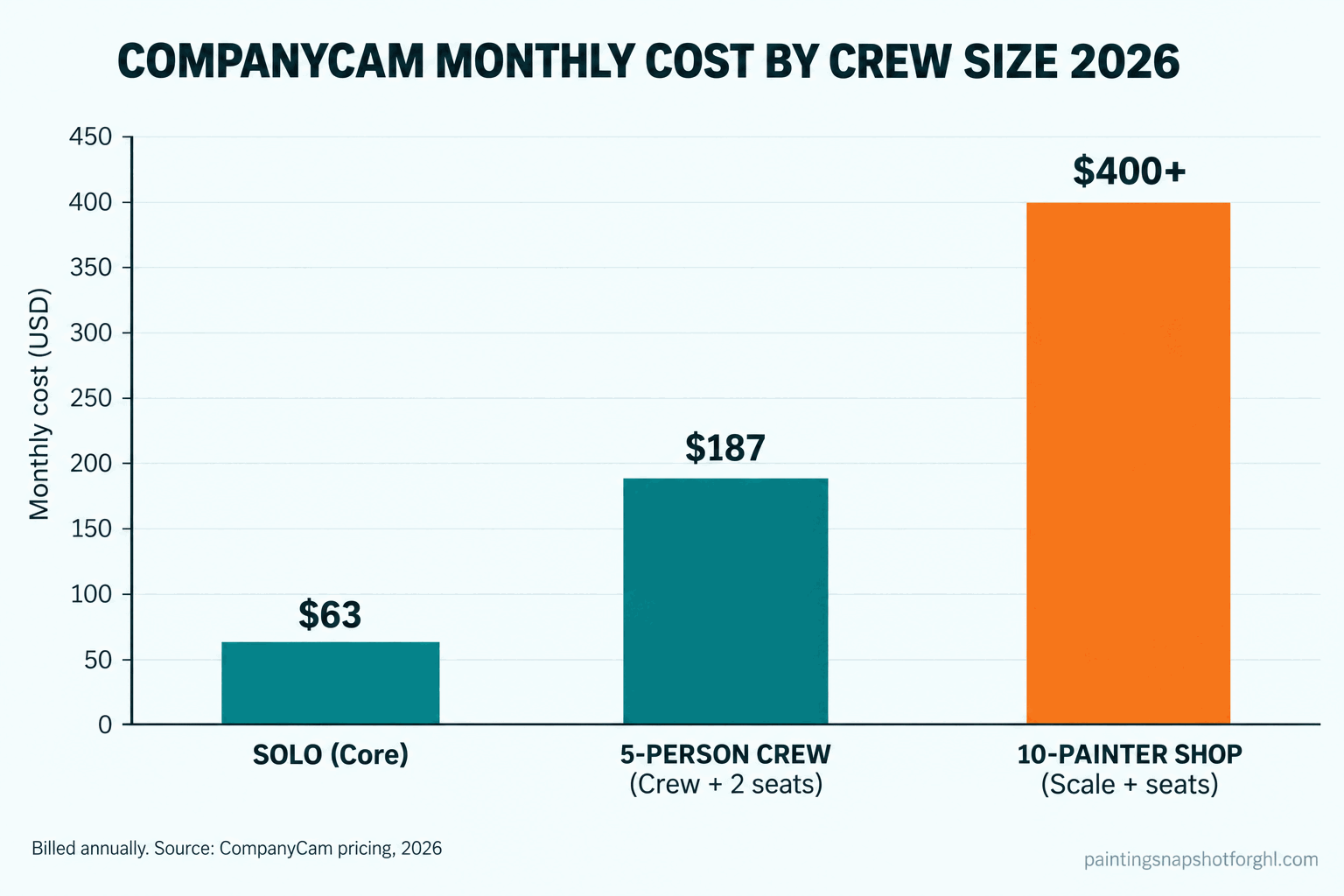
Two numbers decide your real bill, and neither is the sticker. The first is the $29 extra seat: every tier past Core includes three users, so a five-painter crew on Crew is really $129 plus two seats, about $187. The second is the tier gate: measurements, signable agreements, and subcontractor controls live on Scale, not Crew, so if you need them you are shopping $199.
CompanyCam monthly cost, billed annually, 2026. Extra seats are $29/mo each. Source: CompanyCam pricing.
What CompanyCam actually does on a job site
CompanyCam does six things that matter to a painter. Here is each one, and how it breaks.
1. Timestamped, location-tagged photos
The core job. Every photo is stamped with the date, time, and GPS location, and it cannot be faked after the fact. A dated photo of two coats on the garage trim ends the Thursday argument before it starts.
How it breaks: none of this happens if the crew does not shoot the photos. If your painters do not capture prep and progress, you are paying for an empty filing cabinet.
2. Auto-organized project history
Every photo drops into the right project automatically, so a house is a folder, not a scroll through 4,000 camera-roll images. Two years later you can pull up a job in seconds, which a plain phone will never do.
How it breaks: if your team shoots in their native camera app and uploads later, the auto-organizing is gone. The point is capturing inside CompanyCam so it files itself.
3. Reports and PDFs from job photos
Core builds a clean photo report you hand a homeowner or an insurer, and Crew auto-generates them. These are the documents that win warranty claims and make a homeowner feel like they hired a real company, not a guy with a ladder.
How it breaks: a report nobody sends is wasted. Decide which jobs get one delivered, and make it a step, not an afterthought.
4. Before-and-after galleries and client access
The marketing engine. CompanyCam turns raw shots into before-and-after sets you can post or send, and Crew and Scale add custom client access so a homeowner watches progress in real time.
How it breaks: the best before-and-after does nothing sitting in the app. Someone has to push it to Google, Instagram, or a review request. The capture is automatic; the sharing is not.
5. Checklists, job tracking, and crew coordination (Crew and up)
Standardized checklists so every job gets the same prep, a live map of where crews are, and task assignment so the lead painter knows what is next. This is where CompanyCam stops being a camera and starts being light operations.
How it breaks: this overlaps with your CRM. If Jobber or Housecall Pro runs your scheduling, do not pay for two systems to do the same job.
6. Integrations with your CRM and books
CompanyCam connects to Jobber, Housecall Pro, and QuickBooks, so photos attach to the job record in the system you already run (Capterra). It is a photo layer, not a replacement for your field-service software.
How it breaks: painters try to make CompanyCam their whole CRM, and it does that job poorly. Pick it for documentation, pick a real CRM for scheduling and invoicing, and wire them together.
| What you need | CompanyCam tier | Monthly (annual billing) |
|---|---|---|
| Solo, photos and basic reports | Core | ~$63 (1 user, 2 cap) |
| Small crew, checklists and client access | Crew | ~$129 (3 users) |
| 5 painters on Crew | Crew + 2 seats | ~$187 |
| Measurements, agreements, subcontractors | Scale | ~$199 (3 users) |
| 50+ users, multi-location | Enterprise | Custom |
Three real scenarios: solo, five-person crew, big shop
The right tier, and the right total stack, changes with the size of the shop.
The solo painter. One truck, you quote, paint, and invoice yourself. CompanyCam Core (~$63/mo) is plenty: timestamped photos, a report you can hand a homeowner, a price book. Run it next to a lean CRM like Jobber Core (~$49/mo) and your whole stack is around $112 a month. The real risk at a one-person shop is not the bill. It is that every lead landing while you are on a ladder goes unanswered, so lead response matters more here than photo tooling.
The five-person crew. You want checklists so every job gets the same prep, and client access so homeowners can watch progress. That is Crew (~$129/mo), and with five painters needing a login it is really $129 plus two $29 seats, about $187/mo. Add a working-tier CRM like Jobber Grow (~$199/mo) and your stack is roughly $385 a month. This is the size where documentation discipline pays off most, because you are no longer on every job.
The big multi-crew shop. Ten-plus painters, commercial or HOA work, estimators pulling reports all day. You need Scale (~$199/mo) for measurements, signable agreements, and subcontractor controls, and with ten seats you are at $199 plus seven $29 seats, over $400/mo. The documentation is non-negotiable at this size.
For how CompanyCam fits next to the CRMs painters shop, see our best painting business software guide for 2026.
The one job it leaves you (and the copy to steal)
Here is the honest part. CompanyCam is excellent at documenting work you already won. It does nothing about the work you are still trying to win. It does not answer the homeowner who fills out your form at 9pm, text back the missed call from the top of a ladder, or chase the estimate you sent twelve days ago.
That gap is expensive. In the Harvard Business Review study “The Short Life of Online Sales Leads,” firms that reached a lead within an hour were nearly seven times as likely to have a real conversation as those that waited an hour longer, and the average first response was 42 hours. For a painter, 42 hours is three other painters already in the driveway. CompanyCam cannot touch that moment; a response layer in front of your CRM can.
There is one place CompanyCam does touch new revenue, and most painters miss it: the review request tied to the final photo. When the crew shoots the last after photo, the homeowner is at their happiest, and that is the trigger to ask for a Google review. Here is the copy to steal, the messages that should fire on their own.
The review request (fires the day the job is marked complete, right after the final photos):
Hi [Name], the crew just wrapped and your [room/exterior] looks great. We even got some before-and-after shots. If you have 30 seconds, a quick Google review helps a small shop like ours a ton: [link]. Thank you!
The instant missed-call text (fires within 30 seconds of a missed call):
Hi, this is [Name] with [Company]. Sorry I missed you, I’m with a crew right now. Are you after an interior or exterior painting estimate? I can text you a couple of times that work today.
The unsold-estimate follow-up (a 14-day sequence, not one text):
Day 2: Hi [Name], did you get a chance to look over the estimate for your [project]? Happy to walk through any of it. Day 5: Just checking in on the painting quote. We have an opening the week of [date] if the timing works. Day 10: Still want to make this happen for you. Is price, timing, or color holding things up? I can help with any of them. Day 14: Last check-in. If now isn’t the right time, no problem, I’ll keep your color notes on file for when you’re ready.
CompanyCam files the proof; something else has to win the lead and harvest the review. For the full playbook, see painting estimate follow-up and missed call text back for painters.
Compliance a painting shop can’t skip
Documentation is not just marketing. On older homes it is the law, and CompanyCam is a genuinely useful tool for proving you followed it. Three rules shape what you have to do.
EPA lead-paint RRP. If you disturb paint in a home built before 1978, the federal Renovation, Repair and Painting rule requires your firm to be certified and your crew trained in lead-safe work practices. The EPA notes roughly three-quarters of pre-1978 US homes still contain some lead-based paint, so on older houses this is not optional. Dated photos of your containment, cleanup, and verification are exactly the kind of record that shows you worked lead-safe, which is one of CompanyCam’s best quiet use cases.
Advertising the license number. Some states are strict. California requires the contractor license number in all advertising, including your website and vehicle wraps. If your templated site does not show it, that is a website fix.
TCPA and A2P 10DLC on texting. Every review request and follow-up text above is regulated. The TCPA requires prior express consent for marketing texts, and US carriers require A2P 10DLC registration or your messages get filtered. Keep a clear opt-in and an easy STOP, and register your number. Full rundown in our compliance checklist for 2026.
Straight answers to the objections
“Isn’t this just a camera roll with extra steps?” No, and the difference is the whole value. A camera roll is 4,000 unsorted photos you can never find. CompanyCam stamps each shot with date and GPS, files it to the right job automatically, and keeps it for years. When a homeowner disputes a job from a month ago, one of those is proof.
“I already pay for Jobber. Do I need CompanyCam too?” Probably, and they are not competing. Your CRM runs scheduling, quoting, and invoicing; CompanyCam runs documentation. Jobber and Housecall Pro both have photo features, but neither matches CompanyCam for organized, timestamped job history. Most serious shops run both and wire them together, which is why we treat it as part of the real stack in our Jobber vs Housecall Pro breakdown.
“Is Scale really worth three times Core?” Only if you use what it adds: measurements from the camera, signable agreements, and subcontractor access control. A solo painter will never touch those and should stay on Core. A ten-painter commercial shop that measures and subs out work gets its money back fast. Pay for the tier you will actually use.
“My crew won’t use it. Isn’t it a waste then?” This is the real risk. CompanyCam only works if the crew shoots photos inside the app. The fix is one rule: every job gets before, during, and after photos, no exceptions, and the lead painter owns it.
“Will the review texts and galleries annoy customers?” Not when they are fast, relevant, and easy to stop. A homeowner who just watched their kitchen get transformed is glad to see the before-and-after and happy to leave a review. A well-timed ask the day the job wraps feels like good service, because it is. See how to get more 5-star painting reviews.
Frequently asked questions
How much does CompanyCam cost for a painting contractor in 2026?
On annual billing, CompanyCam runs about $63/mo for Core (1 user, capped at 2), $129/mo for Crew (3 users), and $199/mo for Scale (3 users), with extra seats at $29/mo each. Monthly billing is higher, closer to $79, $149, and $249 per third-party trackers. There is no free-forever plan, only a trial. Confirm current pricing on CompanyCam's own page, since seat needs change the real bill.
Is CompanyCam worth it for painters?
For most shops with a crew, yes. It is the best photo-documentation tool in the trade: timestamped, GPS-tagged, auto-organized job photos that settle warranty disputes, feed your marketing, and prove your work. The value depends entirely on the crew actually shooting photos inside the app. A solo painter who rarely gets callbacks can start on Core.
Does CompanyCam replace Jobber or Housecall Pro?
No. CompanyCam is a photo and documentation layer, not a full CRM. It does not run scheduling, quoting, or invoicing the way a field-service platform does. Most painters run it alongside Jobber or Housecall Pro and connect the two, so photos attach to the job record automatically. It also integrates with QuickBooks.
Does CompanyCam help with leads or answering customers?
No. CompanyCam documents work you already booked. It does not answer a brand-new lead in the first minute, text back a missed call, or chase an unsold estimate for two weeks. That is lead-response automation, a separate layer in front of your tools, and it is where most painting revenue actually leaks. CompanyCam's one link to new revenue is prompting a review when the final photos are shot.
Can CompanyCam help with EPA lead-paint compliance?
Indirectly, and usefully. The EPA RRP rule requires firm certification and lead-safe work practices on pre-1978 homes, where about three-quarters still contain some lead-based paint. CompanyCam does not certify you, but dated photos of your containment, cleanup, and verification are exactly the kind of record that shows you worked lead-safe if a question ever comes up.
How many users does each CompanyCam plan include?
Core includes 1 user and is capped at 2. Crew and Scale each include 3 users. Every additional seat is $29/mo on any paid tier. So a five-person crew on Crew pays about $129 plus two seats, roughly $187/mo on annual billing. Enterprise is for 50-plus users and is quote-only.