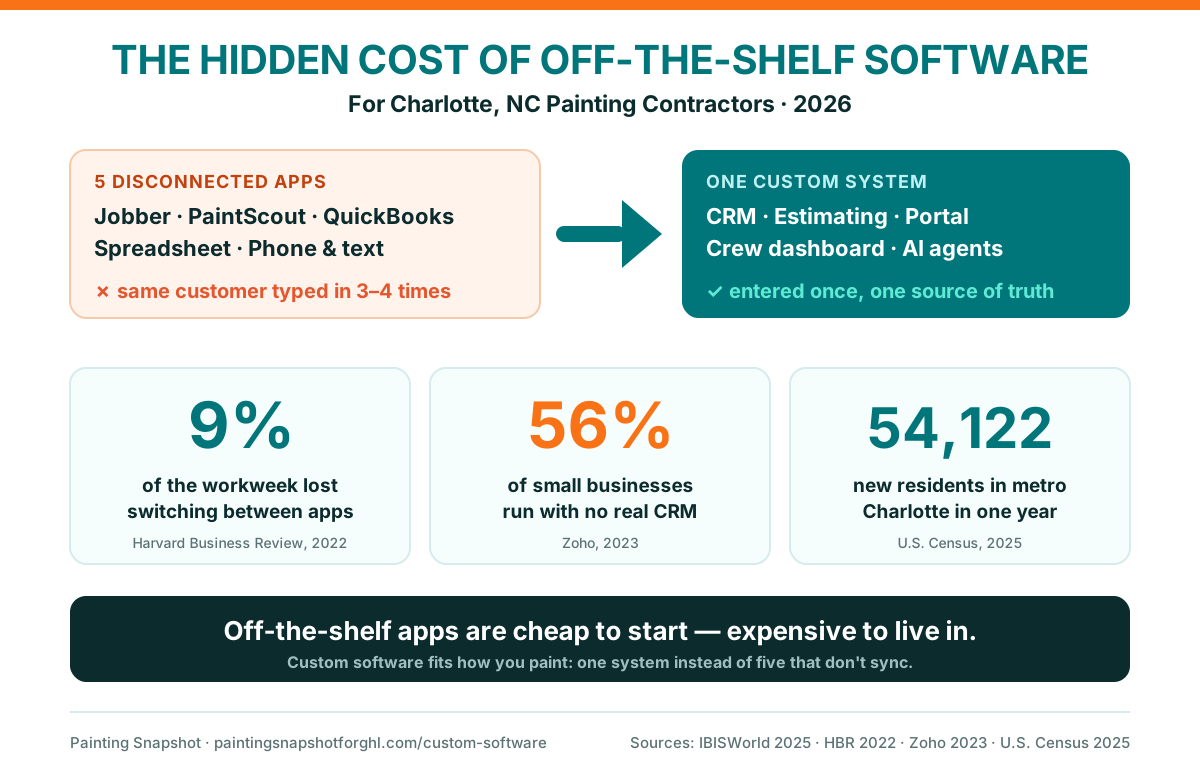
If your Charlotte painting company runs on Jobber for jobs, PaintScout for estimates, QuickBooks for invoices, a spreadsheet for pricing, and your phone for everything else, the software isn’t saving you time — it’s quietly taxing you. None of those tools talk to each other, so the same customer gets typed in three times, updates go out by hand, and nobody can answer “how did we do last month, and at what margin?” without an afternoon of digging. Off-the-shelf apps are cheap to start and expensive to live in. This post breaks down the five hidden costs of that patchwork for a growing Charlotte painter, shows honestly when custom software is worth building (and when it isn’t), and what a system built around your process actually looks like.
In this post
- Why Charlotte painting companies are outgrowing off-the-shelf apps
- The 5 hidden costs of a patchwork of painting apps
- Off-the-shelf apps vs custom software: an honest comparison
- When is custom software worth it for a Charlotte painter?
- What we’d build for a Charlotte painting company
- Frequently asked questions
Why Charlotte painting companies are outgrowing off-the-shelf apps
Charlotte is one of the hottest home-services markets in the Southeast, and the numbers behind it are the reason. The Charlotte–Concord–Gastonia metro was the 5th-fastest-growing metro in the country by raw numeric growth, adding 54,122 residents between mid-2024 and mid-2025 to reach roughly 2.8 million people, while Mecklenburg County alone grew by 26,554 to about 1.2 million (UNC Charlotte Urban Institute, 2025 Census analysis). New arrivals buy homes, and just over half of Charlotte households are owner-occupied (Data USA, ACS) — every one of them a future interior repaint, exterior job, or cabinet-refinishing lead.
That demand is the good news. The bad news is that it’s a crowded field chasing it — nationally there are 342,200 painters in the trade (U.S. Bureau of Labor Statistics, 2024) inside a $28.2 billion, 223,209-business industry (IBISWorld, 2025). When a Ballantyne or Dilworth homeowner requests three estimates on a Tuesday night, the painter whose system responds first and cleanest usually wins the job. And that is exactly where a stack of disconnected apps quietly falls apart.
Here’s the pattern I see over and over as an operations consultant: a shop starts solo with a notebook, adds a scheduling app, then an estimating tool, then QuickBooks, then a texting app, then a spreadsheet to tie it all together. Each tool solved yesterday’s problem. Together, they’ve become today’s problem — because the one thing none of them do is talk to each other. You’ve outgrown the tools, and the tools are now slowing you down more than they help.
The 5 hidden costs of a patchwork of painting apps
The subscriptions aren’t the expensive part. The expensive part is everything that happens between the apps — the re-typing, the manual updates, the reports that don’t exist, the leads that go cold. Here are the five hidden costs, roughly in order of what they drain from a growing painting business.
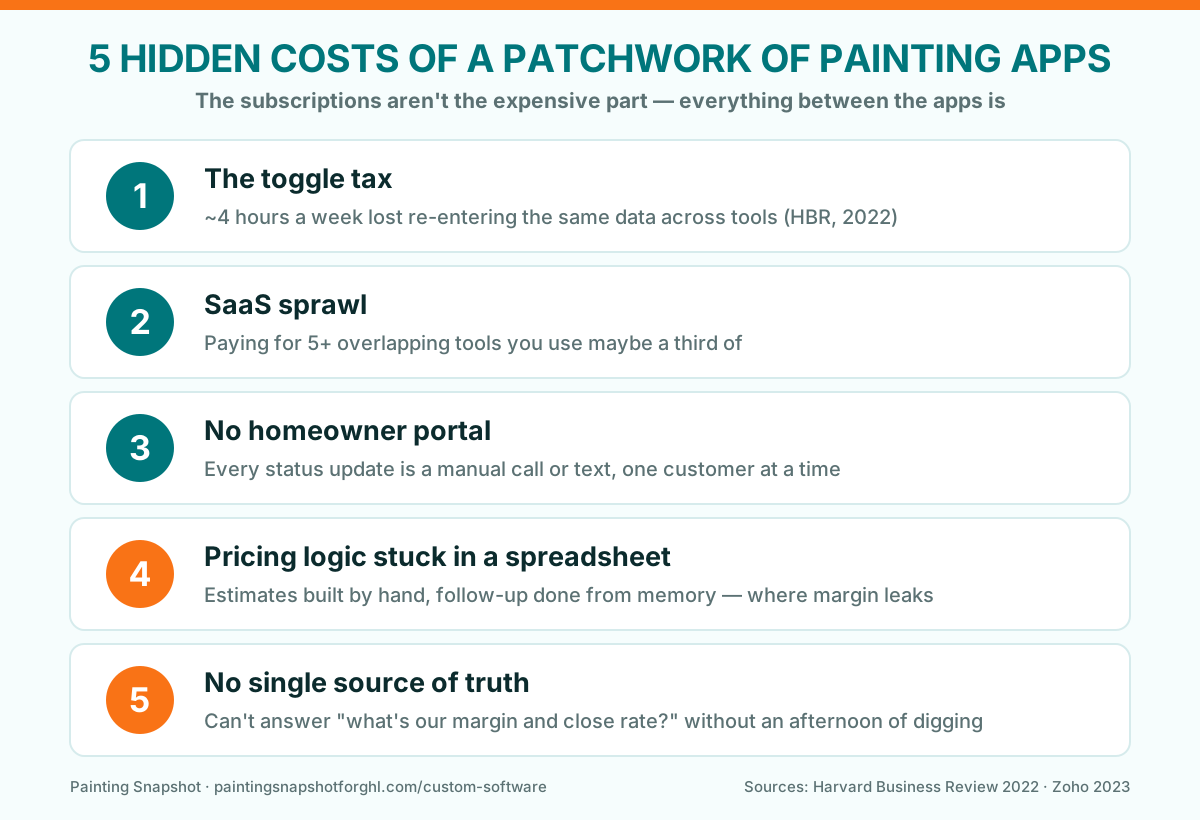
Cost #1: The toggle tax — hours lost re-entering the same data
The most measurable cost of a disconnected stack is the time your team spends copying data between tools. It has a name in the research: the toggle tax. A study of real software usage across thousands of users found that people switch between applications about 1,200 times a day and lose just under 4 hours every week — roughly 9% of their total time at work — simply re-orienting after each switch (Harvard Business Review, 2022).
For a painting shop, that toggle tax is concrete. A new lead comes in through a Facebook form. Someone copies the name and number into your scheduling app to book the estimate. After the walkthrough, the details get re-typed into PaintScout to build the quote. When the job is won, it’s entered again into QuickBooks for the deposit invoice, and maybe a fourth time into a spreadsheet you use to track the pipeline. Same customer, four manual entries — and every hand-off is a chance to fat-finger a phone number or lose a job in the gap.
Hours in a 40-hour week: about 4 are lost to toggling between disconnected apps (~9% of the week). Custom software that shares one database removes most of that switching. Source: Harvard Business Review, 2022.
Four hours a week is half a workday. For an owner or an office manager, that’s the difference between chasing this week’s estimates and letting them sit.
Cost #2: SaaS sprawl — paying for overlapping tools you barely use
The second cost is the stack itself. Most painting shops don’t choose their software so much as accumulate it, and the tools overlap. Jobber, Housecall Pro, PaintScout, Markate, Estimate Rocket, a separate texting line, an email tool, QuickBooks — several of them do CRM-ish things, several do invoicing-ish things, and you’re paying a monthly fee for each while using maybe a third of what any one offers.
The waste is real across the software world: license-management analyses consistently find that a large share of paid SaaS seats sit unused or underused. For a painter, the sprawl shows up as a creeping monthly bill and a team that has to remember which of five logins holds the answer to a customer’s question. Consolidation is half the reason shops eventually move to a single system — whether that’s a CRM like GoHighLevel or custom software built around the whole operation.
Cost #3: No homeowner portal — every update is a manual call or text
Ask any Charlotte homeowner what they hate about hiring a contractor and “I never knew what was happening” is near the top. Off-the-shelf painting apps rarely give the customer a place to log in. So every status update — “your estimate is ready,” “you’re on the schedule for the 14th,” “here are the before-and-after photos,” “your deposit link” — is a phone call or a text you send by hand, one customer at a time.
That manual back-and-forth is invisible on a slow week and crushing in peak season. It’s also a competitive gap: buyers increasingly expect to self-serve, review options, and approve online on their own time. A branded homeowner portal — where customers review and approve estimates, pick options, see their schedule and job status, view photos, and pay a deposit — turns a dozen manual touches into zero. It’s one of the most-requested custom software builds for exactly that reason.
Cost #4: Your pricing logic lives in a spreadsheet (or your head)
Here’s the one that costs margin. The way your shop prices work — coats, prep condition, ceiling height, cabinet counts, surface type, per-crew rates, that seasonal exterior premium — is the core intellectual property of your business. And in most painting companies it lives in a spreadsheet, a saved template, or the owner’s memory. No off-the-shelf estimating app encodes it exactly, so estimates get built by hand and follow-up gets done from memory.
That matters because estimate follow-up is where painting revenue is won or lost. When your pricing and your pipeline live in separate places, quotes fall through the cracks — the homeowner who got a number on Monday and never heard from you again booked with whoever followed up. (We break the cadence down in painting estimate follow-up.) Custom estimating software encodes your pricing once, generates a branded proposal in a click, and drops the deal straight into an automated follow-up sequence — so the quality of your follow-up no longer depends on how busy this week was.
Cost #5: No single source of truth
The fifth cost is the one owners feel at the end of the month. When leads live in one app, jobs in another, invoices in QuickBooks, and photos on a crew member’s phone, there is no single place that can answer the questions that actually run a business: How many jobs did we close last month? At what margin? Which lead source is worth the money? How many estimates are sitting un-followed-up right now?
Most small businesses never solve this. In Zoho’s survey of 1,500+ US small businesses, 56% had no CRM at all — and of those, 39% were running on spreadsheets and email, 9% on siloed apps, and 8% on pen and paper (Zoho, 2023). Without one source of truth, you’re flying on gut feel — and gut feel is expensive when a wrong guess about your best lead source means thousands in wasted ad spend.
Off-the-shelf apps vs custom software: an honest comparison
To be clear: off-the-shelf tools are the right starting point for most painters. A solo operator does not need custom software — Jobber or a simple CRM is perfect. The comparison below is for the shop that has outgrown that stage and is feeling all five hidden costs at once.
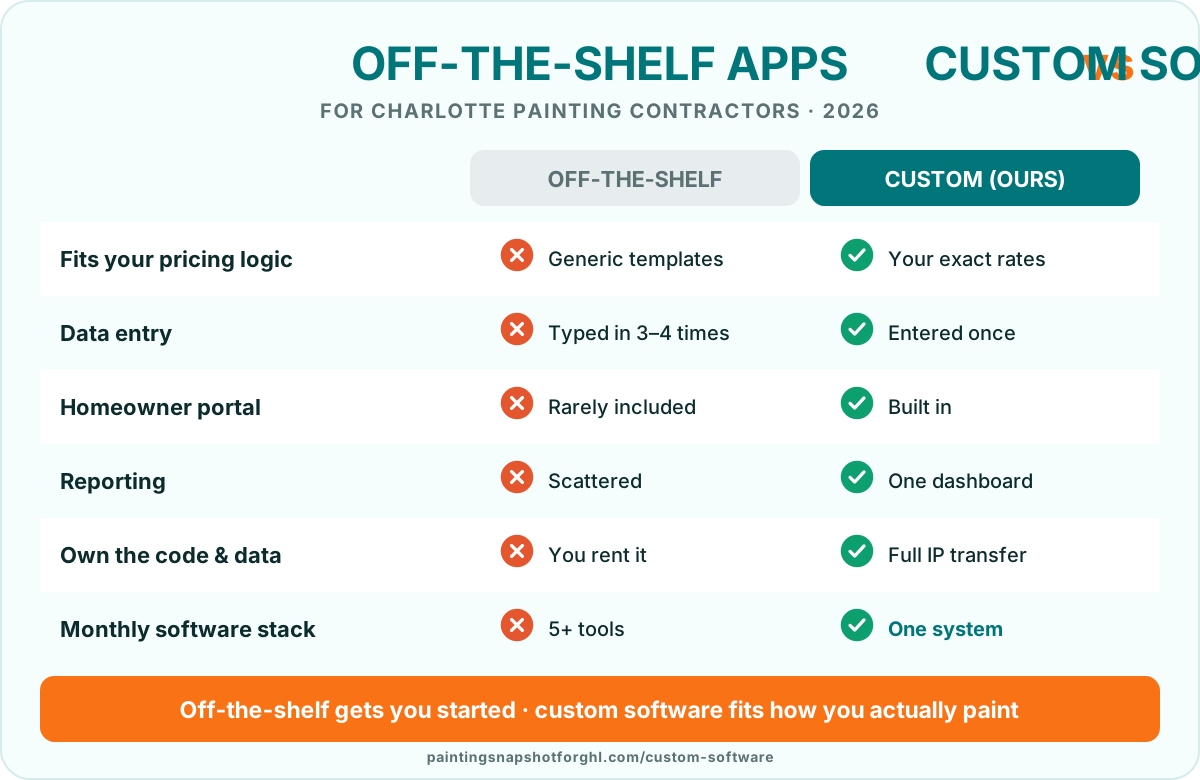
| Factor | Off-the-shelf apps | Custom software |
|---|---|---|
| Fits your pricing logic | Generic templates; you work around them | Your exact coats/prep/sq-ft/cabinet rates encoded |
| Data entry | Same customer typed into 3–4 tools | Entered once, everywhere it needs to be |
| Homeowner portal | Rarely included | Branded approvals, schedule, photos, payments |
| Reporting | Scattered across apps; no single answer | One dashboard: close rate, margin, revenue per crew |
| Monthly stack | 5+ overlapping subscriptions | One system your team logs into |
| Setup cost & time | Low — sign up today | Higher up front — a scoped build over weeks |
| Best for | Solo & small painters getting started | Multi-crew shops with a specific process |
| Ownership | You rent it; features come and go | You own the code & data (full IP transfer) |
Custom-software details reflect current published terms on our custom software page; timelines and scope are set per project.
When is custom software worth it for a Charlotte painter?
Custom software is not the answer for everyone, and any honest developer will tell you so. Building something around your exact process costs more up front than a monthly app, so it only pays off when the pain is big enough. Here’s the framework I use with painting shops.
The honest middle path is worth naming: a lot of shops don’t need fully custom software — they need their existing tools connected and their follow-up automated. That’s often a GoHighLevel build or a set of custom integrations rather than a ground-up app. The right call depends on how specific your process is and how much the five hidden costs are actually draining you. A good discovery call sorts that out in 30 minutes.
What we’d build for a Charlotte painting company
When a painting shop has clearly outgrown off-the-shelf tools, four builds solve most of the pain. Each one collapses several disconnected apps into a single system built around how you actually work.
- A custom CRM + estimating system. Your exact pricing logic — coats, prep, square footage, cabinet counts, per-crew rates — encoded once, with a lead pipeline tuned to your sales process, one-click branded proposals with e-sign, deposit/progress/final invoicing, and margin reporting. This is the build that replaces the spreadsheet-and-memory stack.
- A homeowner estimate & job portal. A branded login where customers review and approve estimates, pick options, see their schedule and job status, view before-and-after photos, and pay deposits — cutting the manual back-and-forth to near zero.
- A crew production dashboard. A mobile-first board for the field: today’s jobs by crew, surface type, coating spec, prep notes, and checklists, so nobody paints the wrong color or shows up to the wrong address.
- Custom AI agents that speak painter. A quote-request qualifier that asks interior-vs-exterior, room count, and prep condition; a voice receptionist that books estimates 24/7; and follow-up agents that work unclosed quotes over SMS and email until the homeowner books or opts out.
The reason this is worth it is the same reason CRM has paid back multiples for two decades. Nucleus Research measured CRM returning $8.71 for every $1 spent at its peak, and a more recent, more conservative update at $3.10 per $1 (Nucleus Research). Even at the lower figure, the return for a painting shop shows up as faster lead response, fewer estimates falling through the cracks, and more finished jobs turning into reviews — all from one system instead of five.
Reported CRM/software return per $1 spent (USD). The figure has come down as the market matured but stays well above breakeven. Source: Nucleus Research.
And speed is the multiplier. A single system is what makes instant lead response possible — and the classic Harvard Business Review analysis found that contacting a web lead within an hour made it about 7× more likely to qualify, and 60× more likely than waiting a full day (HBR, 2011); a separate MIT/InsideSales study put responding within 5 minutes at about 21× more likely to qualify the lead (Lead Response Management). You can’t hit those windows when a lead is sitting in an app nobody’s watching. That’s the whole case for consolidating — see also our breakdown of missed-call text-back for painters and the real cost of running GoHighLevel yourself.
If you’re earlier in the journey and just want your follow-up handled without a custom build, the done-for-you painting snapshot installs the full automation stack in about 24 hours, and a dedicated GHL VA can run it for you. Custom software is the next tier up — for when off-the-shelf genuinely can’t fit how you paint.
Frequently asked questions
What is custom software for a painting business, and how is it different from Jobber or PaintScout?
Off-the-shelf tools like Jobber, Housecall Pro, or PaintScout are built for the average contractor and force you to work their way. Custom software is built around YOUR pricing logic, YOUR sales process, and YOUR crews — a CRM and estimating system, a homeowner portal, crew dashboards, or AI agents that fit exactly how your shop estimates and closes work. You stop paying for features you don't use and stop working around the ones that don't fit.
How much does custom software for a painting company cost?
It's scoped per project after a free discovery call, because the right build depends on your process. As a rough guide, simple AI agents run a few weeks, a homeowner portal is a mid-size build, and a full custom CRM and estimating system is the largest. It costs more up front than a monthly app — which is why it only makes sense once you've outgrown off-the-shelf tools and are feeling the hidden costs (double data entry, no portal, no unified reporting). Every fixed-price build includes a 30-day bug-fix warranty and full IP transfer.
Do I actually need custom software, or should I just connect the tools I have?
Often the honest answer is the latter. A lot of painting shops don't need fully custom software — they need their existing tools connected and their follow-up automated, which is usually a GoHighLevel build or a set of integrations rather than a ground-up app. Custom software is worth it when your process is specific enough that no off-the-shelf tool fits, you're multi-crew or multi-location, or you're running five or more overlapping apps. A discovery call sorts out which path fits.
Can you build a customer or homeowner portal for my Charlotte painting business?
Yes — it's one of the most-requested builds. We create branded portals where homeowners review and approve estimates, choose options, see their schedule and job status, view before-and-after photos, and pay deposits, plus crew dashboards for the field. It cuts the manual update calls and texts to nearly zero, which is a real edge in a competitive market like Charlotte.
Do I own the code and data if you build custom software for me?
Always. Full IP transfer is included by default — the code lives in your repository, deploys to your infrastructure, and runs under your accounts, and your data is yours. That's a core difference from renting an off-the-shelf app, where features can change or disappear and your data lives on someone else's platform.
Is it worth investing in software when I could just hire another office person?
They solve different problems, and the math usually favors the system. A patchwork of apps costs your team roughly 9% of their week just switching between tools (Harvard Business Review, 2022), and CRM/software has historically returned multiples per dollar spent (Nucleus Research). A person re-typing data between five apps is expensive and error-prone; software that shares one database removes the re-typing entirely, so your office time goes to booking jobs instead of copying records.
Travis is a recovering project manager who ran scheduling for a commercial and HOA painting outfit before moving into systems consulting. He is the person crews call when the pipeline is a mess of sticky notes and missed reminders. He maps the messy real-world back office of a painting business into clean software and workflows, and he writes about custom CRMs, portals, migrations, and the unglamorous automations that quietly save the most money.
Related posts
- How to Migrate Your Painting Business to GoHighLevel: A Step-by-Step Playbook
- GoHighLevel vs Jobber for Painters: Which CRM Actually Books More Jobs?
- The Real Cost of Running GoHighLevel Yourself: Why Painting Contractors Hire a GHL VA
- Painting Estimate Follow-Up: The Sequence That Wins Back Lost Quotes
- Missed-Call Text-Back for Painters: Never Lose a Lead to Voicemail
Painting Snapshot builds done-for-you GoHighLevel automation systems, custom software, GHL development and migrations, fast Astro websites, and social media content for house painting contractors. We are not a painting company and do not perform painting work or quote project pricing. The industry, market, software-usage, CRM ROI, lead-response, and Charlotte figures above are drawn from the cited third-party sources (IBISWorld, U.S. Census / UNC Charlotte Urban Institute, BLS, Harvard Business Review, Zoho, Nucleus Research, MIT/InsideSales, Data USA) and reflect general benchmarks, not a guarantee of results for any specific painting business. Service scope, timelines, and pricing reflect current published terms and may change — verify on our custom software and pricing pages.