GoHighLevel contact quick actions: a touch-up kit on every contact
GoHighLevel contact quick actions put one-click tags, buttons and mini forms on every contact record. An estimator taps "Estimate sent", an office manager taps "Deposit paid", and your existing workflows take it from there. From the Two Coats package, in 6 positions.
What do GHL quick tags save a painting office?
Time and mistakes. Typing tags by hand is slow and easy to misspell, and a misspelled tag never triggers its workflow. A quick tag is one tap, always spelled the same, and starts the right follow-up every time.
Try the contact actions bar
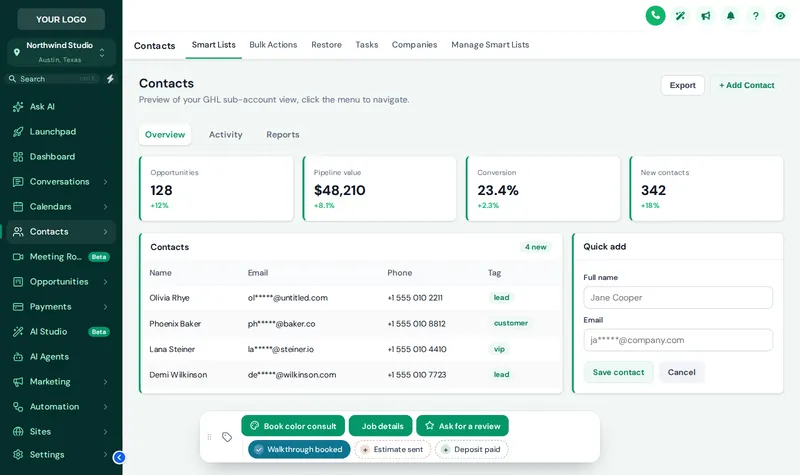
Tap a quick tag, open Job details to see its mini form, or drag the bar by its grip. Change chip colors and position above it. Nothing is saved.
Mixing the live preview…
A color per tag: this is the real contact actions bar. Tap a quick tag to add or remove it, open Job details to see its form, or drag the bar by its grip. Nothing is saved in the preview.
Quick tags, buttons and mini forms
Quick tags
Chips that add or remove a tag in one tap. Good for job stages: walkthrough booked, estimate sent, deposit paid, job complete.
Buttons
Labeled buttons with an icon, such as "Book color consult" or "Ask for a review", that add tags your workflows listen for.
Mini forms
A short form that saves into custom fields: job type, square footage, preferred start. No scrolling through the whole contact page.
How to set up GoHighLevel contact quick actions
List the tags your office types by hand, turn them into quick tags and buttons, add a mini form for job details, then point your existing workflows at those tags.
- List
Pick the tags your office adds by hand
Think of the tags someone types ten times a day: walkthrough booked, estimate sent, deposit paid, color consult. Those become one-click quick tags.
- Build
Add buttons and mini forms
A button can add or remove tags; a mini form can update custom fields such as job type, square footage or preferred start date.
- Place
Choose position and colors
Put the bar in one of 6 positions, give each tag its own color or use your brand color, and let staff drag it aside.
- Connect
Let your workflows react
Point GoHighLevel workflows at those tags. Tapping "Estimate sent" can start the follow-up sequence you already use.
Contact actions questions
Quick tags, buttons, mini forms and how they connect to the workflows you already run.
8 questions
What is the GoHighLevel contact actions bar?
It is a small bar that sits on every contact record with one-click quick tags, buttons and mini forms. Instead of opening the tag field and typing, staff tap "Estimate sent" or "Deposit paid" and the tag is added straight away.
What do GHL quick tags do?
A quick tag adds a tag to the contact with one tap, and tapping again removes it. Because GoHighLevel workflows can start on a tag being added, a quick tag can also kick off a follow-up, a review request or an internal notification.
Can a button update custom fields?
Yes. A button can open a mini form that saves straight into the contact's custom fields, for example job type, square footage and preferred start date, without scrolling through the full contact page.
Where does the bar appear?
On contact records, in one of 6 positions: top or bottom, left, center or right. Staff can drag it by its grip if it covers something.
Does it replace GoHighLevel workflows?
No. It makes the manual step faster. Your workflows still do the automation; the bar just adds the tag or saves the field that triggers them.
Which package includes contact actions?
Two Coats ($367) and Masterpiece Finish ($747). Primer does not include it.
Is anything saved when I try the preview?
No. The live preview on this page uses a copy of a GoHighLevel contact. Tags and fields respond, but nothing is saved or sent.
Can I use different colors for each tag?
Yes. Give every quick tag its own color, use your brand color for all of them, or use a simple green-on, grey-off scheme. Try all three in the preview.
No question matches that. Try another word, or ask us directly.
More colors in the deck
Tag the job in one tap
The contact actions bar comes with Two Coats, together with dashboards, pipelines and menus. $367, paid once.
GoHighLevel and HighLevel are trademarks of HighLevel Inc. Painting Snapshot is independent and is not affiliated with, endorsed by or sponsored by HighLevel. The GHL Customizer is a third-party tool that restyles the interface; it does not change your contacts, workflows or automations. Packages start at $147, one-time. Prices in USD.
Last updated · counts from the customizer catalog