A floating contact widget for painting websites, like a palette in hand
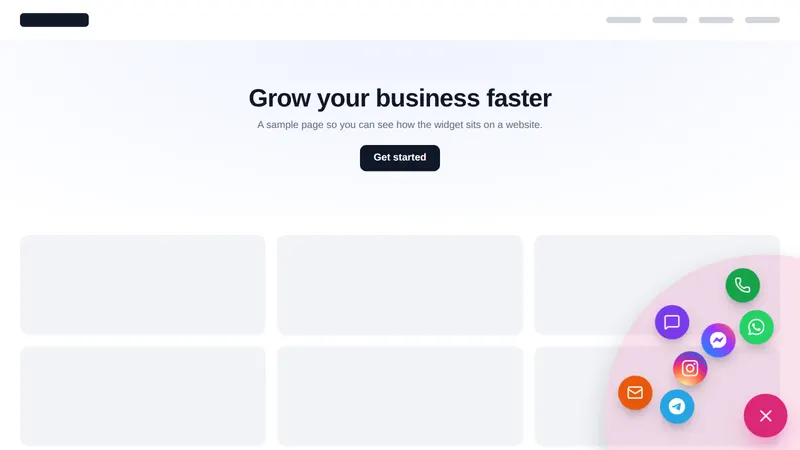
A floating contact widget keeps every way to reach you one tap away on every page: call, text, WhatsApp, booking, reviews or a short video. The customizer has 51 templates in 7 types, including the radial contact menu shown here, with up to 10 live on Masterpiece Finish.
What does a GHL floating widget do?
It gives homeowners one obvious, always-visible way to contact you, whatever page they are on. One launcher opens a hub of channels, a short form, reviews or a video, and form leads go into GoHighLevel on the Masterpiece Finish package.
Try every floating widget on a sample site
Pick a type and a template; click the launcher inside the preview to close and reopen it. Switch the page to inside GoHighLevel to see it there. Nothing is sent.
Mixing the live preview…
Radial contact menu: every chip is a real template, drawn by the engine that runs on your website. Click the launcher inside the preview to close and reopen it; nothing is sent anywhere.
Which floating widget should a painter use?
Start with a contact hub: it covers call, text and booking in one button. Add a reviews widget once you have strong Google reviews, and a video bubble if you have a short owner welcome or a before-and-after clip.
| Type | Templates | What it does |
|---|---|---|
| Social links | 11 | One button that opens all your social profiles |
| Contact & chat hub | 13 | WhatsApp, Messenger, call, email, live chat, booking... in one menu |
| Contact form | 7 | A short built-in form, or your own GoHighLevel / Typeform / Jotform / Google form |
| Reviews | 6 | Review cards with stars, or your own review widget (GoHighLevel, Google, Trustpilot) |
| Embed a page | 4 | Any URL in a panel, drawer or modal: booking page, help centre, pricing... |
| Video | 5 | YouTube, Vimeo, Loom or MP4 - in a panel or a round video bubble |
| Multi-tab widget | 5 | Chat | Social | Form | Reviews | Video in one launcher, with tabs |
How to add a floating contact widget
Pick a template, add your channels, set the shape, opening style and look, then switch it on for your domains. It takes about ten minutes in the editor.
- Choose
Pick a widget type and template
Start from one of 51 templates in 7 types: contact hub, form, reviews, video, social links, embedded page or multi-tab.
- Fill
Add your channels
Add the ways homeowners can reach you: call, text, WhatsApp, Messenger, email, a booking link or your GoHighLevel form.
- Style
Set shape, opening and look
Choose one of 6 launcher shapes, 8 ways to open and 8 looks, with your accent color and position.
- Launch
Switch it on for your site
Turn it live on your allowed domains. Masterpiece Finish keeps up to 10 floating widgets live at once.
Floating widget questions
Channels, templates, leads and how the widget sits next to your chat.
8 questions
What is a floating contact widget?
It is a button that floats in a corner of every page of your website and opens your contact options: call, text, WhatsApp, Messenger, email or a booking link. A homeowner reading about cabinet refinishing can reach you without hunting for the contact page.
Why use a floating contact widget on a painting website?
Because homeowners browse on phones, often in the evening, and pick the easiest way to reach you. One button that offers a text, a call or a booking link catches people who would never fill in a long form.
What is the radial contact menu?
It is a floating widget template where the contact channels burst out in a circle around the launcher. It is the default in the preview above and works well on phones because each channel is a large round target.
How many floating widget templates are there?
51 templates in 7 types, with 6 launcher shapes, 8 opening styles and 8 looks. The contact hub supports 15 channels and the social widget 34 networks.
Can the widget show reviews or a video?
Yes. 6 templates show review cards or your own review widget, and 5 play a YouTube, Vimeo, Loom or MP4 video in a panel or a round bubble.
Do form leads go into GoHighLevel?
Yes. On Masterpiece Finish, leads from widget forms are sent into GoHighLevel, so they land in your pipeline with the rest of your leads.
Which package includes floating widgets?
Masterpiece Finish ($747), with up to 10 live at once.
Will it clash with the GoHighLevel chat widget?
Place them apart: put the floating widget on the opposite corner, or use the contact hub template that includes live chat as one of its channels so there is only one button.
No question matches that. Try another word, or ask us directly.
More colors in the deck
Keep the palette in reach on every page
Floating widgets come with Masterpiece Finish, with popups, notifications and calculators. $747, paid once.
GoHighLevel and HighLevel are trademarks of HighLevel Inc. Painting Snapshot is independent and is not affiliated with, endorsed by or sponsored by HighLevel. The GHL Customizer is a third-party tool that restyles the interface; it does not change your contacts, workflows or automations. Packages start at $147, one-time. Prices in USD.
Last updated · counts from the customizer catalog