GoHighLevel menu customization is the trim work
Trim is where a paint job looks sharp or sloppy. In GoHighLevel, that is the menu. GoHighLevel menu customization lets you rename, reorder and hide items, move to a top bar, open sections as one of 8 mega menus and add a floating quick menu. From the Two Coats package.
What can you change in the GoHighLevel menu?
Almost everything about how it looks and where it sits: item names, order, visibility, headings, icons, sidebar or top bar, sub-menu style, header style and an optional floating quick menu. What a user is allowed to open still comes from GoHighLevel's own roles.
Try sidebar, top bar and mega menu layouts
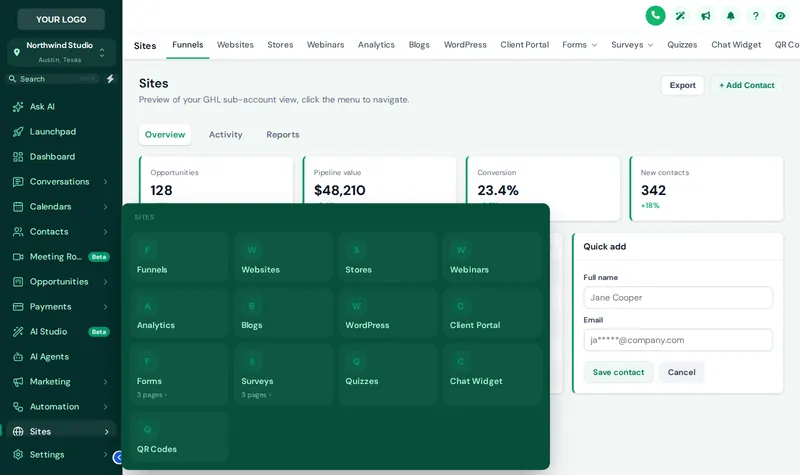
Pick a layout, then hover the menu inside the preview. With a mega style chosen, hover Sites to watch it open. We start on Forest Finance with the Tiles mega menu.
A quick menu for the five pages that matter
The floating quick menu is a launcher that sits over every GoHighLevel page with shortcuts you choose. An estimator on a tablet can jump from a contact to the calendar without opening the full sidebar.
- 3 layouts: Bubble + grid, Dock bar, Side rail.
- 8 finishes: Classic, Dark, Glass, Brand, Neon, Soft, Minimal, Aurora.
- Draggable, so it never covers the field someone is typing in.
A GHL sidebar menu that fits a painting office
BeforeThirty items, one long list
- New hires scroll past AI Studio and Memberships to find Calendars
- "Opportunities" means nothing to a crew lead
- Sub-pages hide behind small arrows
AfterYour words, your order
- The daily pages at the top, the rest tucked away
- "Estimates", "Jobs" and "Reviews" in plain language
- Sections that open as a scannable mega menu
How to customize the GoHighLevel menu
List the pages your team uses, rename and reorder them, pick a layout and sub-menu style, then save and check both the agency view and the sub-account view.
- Measure
List the pages your team really uses
Most painting offices live in five or six pages: Conversations, Calendars, Contacts, Opportunities, Payments. Start there.
- Mask off
Rename, reorder and hide
Drag menu items into order, rename them in your own words ("Estimates" instead of "Opportunities") and hide what nobody opens.
- Trim
Choose layout and sub-menu style
Pick sidebar or top bar, one of 8 mega menu styles, a header style and, if you like, the floating quick menu.
- Cure
Save and check both views
Menus can differ between the agency view and sub-accounts. Save, check both in the preview, and the change is live on the next page load.
Menu and navigation questions
Renaming, hiding, mega menus, the quick menu, and which package unlocks them.
8 questions
Can I customize the GoHighLevel sidebar menu?
Yes. With Two Coats or above you can rename, reorder and hide menu items, group them under headings, and choose a sidebar, a top bar, 8 mega menu styles and 8 header styles. Primer lets you choose between sidebar and top-bar layout only.
Does hiding a menu item remove access to that page?
No. Hiding is visual. It declutters the menu for your team, but it is not a permission setting; GoHighLevel user roles still control who can open what.
What is a mega menu in GoHighLevel?
A mega menu opens a large panel when someone hovers or taps a section, showing its sub-pages in columns, tiles, tabs or another of the 8 styles. It replaces long nested lists with a layout people can scan.
What is the floating quick menu?
A small launcher that floats over every page with shortcuts to the pages you pick. It comes in 3 layouts (bubble and grid, dock bar, side rail) and 8 finishes, and staff can drag it out of the way.
Can I rename "Opportunities" to "Estimates"?
Yes. Menu labels are yours to change, which helps a painting office use its own words. The page itself stays the GoHighLevel opportunities board.
Can the agency view and the sub-accounts have different menus?
Yes. The agency menu and the sub-account menu are set separately, so agency staff and painting company staff each see what they need.
Which package includes menus and navigation?
Two Coats ($367) and Masterpiece Finish ($747). Primer includes the sidebar or top-bar choice only.
Will GoHighLevel updates break my menu?
The menu layout is applied by the customizer script, which the platform maintains as GoHighLevel changes, so you do not rewrite anything yourself. If HighLevel adds a brand-new page, check the menu settings and place or hide it.
No question matches that. Try another word, or ask us directly.
More colors in the deck
Cut in clean lines around your menu
Menus, the floating quick menu, dashboards, pipelines and contact actions all come with Two Coats: $367, paid once.
GoHighLevel and HighLevel are trademarks of HighLevel Inc. Painting Snapshot is independent and is not affiliated with, endorsed by or sponsored by HighLevel. The GHL Customizer is a third-party tool that restyles the interface; it does not change your contacts, workflows or automations. Packages start at $147, one-time. Prices in USD.
Last updated · counts from the customizer catalog