GHL pipeline design: color-code every estimate stage
GHL pipeline design restyles the GoHighLevel opportunities board so an estimate pipeline reads at a glance. Choose from 12 board designs, from calm and compact to the loud Neo Brutal below, and stage colors follow each column automatically. From the Two Coats package.
Why does pipeline board style matter for painters?
A painting company's revenue sits in the estimates column. When each stage has its own color and cards are easy to scan, nobody misses the estimate that has waited five days for a follow-up call. The board's look is a working tool, not decoration.
Most painting offices run a simple pipeline: new lead, walkthrough booked, estimate sent, follow-up, won, lost. The stock GoHighLevel board shows all of them in the same grey. A styled board turns the same data into a picture of the week. Combine it with the contact actions bar to tag a job as it moves.
- Designs
- 12 board styles, 2 dark
- Stage colors
- By column position, so any stage names work
- Changes
- Canvas, headers, cards, stage colors, toolbar
- Leaves alone
- Stages, opportunities, values, automations
- Included in
- Two Coats and Masterpiece Finish
Try all 12 GoHighLevel opportunities board designs
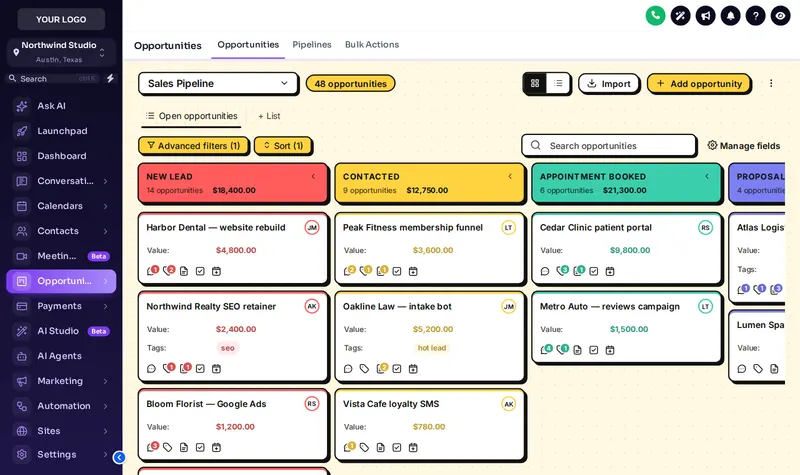
Click a design to restyle a copy of the opportunities board. We start on Neo Brutal: thick outlines, hard shadows and loud stage colors you cannot miss.
Mixing the live preview…
Neo Brutal: a copy of the GoHighLevel opportunities board, restyled by the real engine. Stage colors follow column position, so your own stages (new lead, walkthrough booked, estimate sent, won) pick them up whatever they are called.
The board designs in the account
Twelve designs, each with its own canvas, card style and stage palette. Pick one for the office and stick with it; consistency is what makes a board readable.
From a grey board to a painting estimate pipeline you can read
BeforeEvery column the same grey
- Estimates sent last week blend into new leads
- Cards are dense and hard to scan on a tablet
- The board looks the same as every other agency's
AfterA board that tells the story
- Each stage has its own color, whatever it is called
- Cards with clear values and owners
- Your board, in your colors, on every sub-account
Pipeline design questions
What the designer changes on the opportunities board, and what it never touches.
8 questions
What is GHL pipeline design?
It is restyling the GoHighLevel opportunities board: the canvas background, column headers, stage colors, cards and toolbar. The customizer has 12 pipeline designs, from clean and compact to Neo Brutal and dark boards, and they apply to every pipeline you have.
Does it change my pipeline stages or opportunities?
No. Stages, opportunities, values, owners and automations stay exactly as they are. Only the board's look changes, so nothing in your workflows needs touching.
How do stage colors work if my stages have different names?
Stage colors follow column position, not the stage name. Whether your first column is "New lead" or "Estimate request", it picks up the first color, and so on across the board.
Why style a painting estimate pipeline at all?
Because the board is where jobs slip. When "estimate sent" and "deposit paid" look different at a glance, the office manager sees which estimates are waiting on a follow-up call before they go cold.
Is there a dark pipeline board?
Yes, 2 of the 12 designs are dark, with light text on dark columns and cards.
Which package includes the pipeline designer?
Two Coats ($367) and Masterpiece Finish ($747). Primer does not include it.
Can I change the board design later?
Yes, as often as you like. Pick a different design in the editor and save; with the install line in place, the new board shows on the next page load. Version history keeps your earlier saves.
Can I match the board to my brand color?
Yes. The Brand Match design builds its stage colors from your primary color, and any design's accent can be changed in the editor.
No question matches that. Try another word, or ask us directly.
More colors in the deck
Give every estimate stage its own color
The pipeline designer comes with Two Coats, along with dashboards, menus and the contact actions bar. $367, paid once.
GoHighLevel and HighLevel are trademarks of HighLevel Inc. Painting Snapshot is independent and is not affiliated with, endorsed by or sponsored by HighLevel. The GHL Customizer is a third-party tool that restyles the interface; it does not change your contacts, workflows or automations. Packages start at $147, one-time. Prices in USD.
Last updated · counts from the customizer catalog