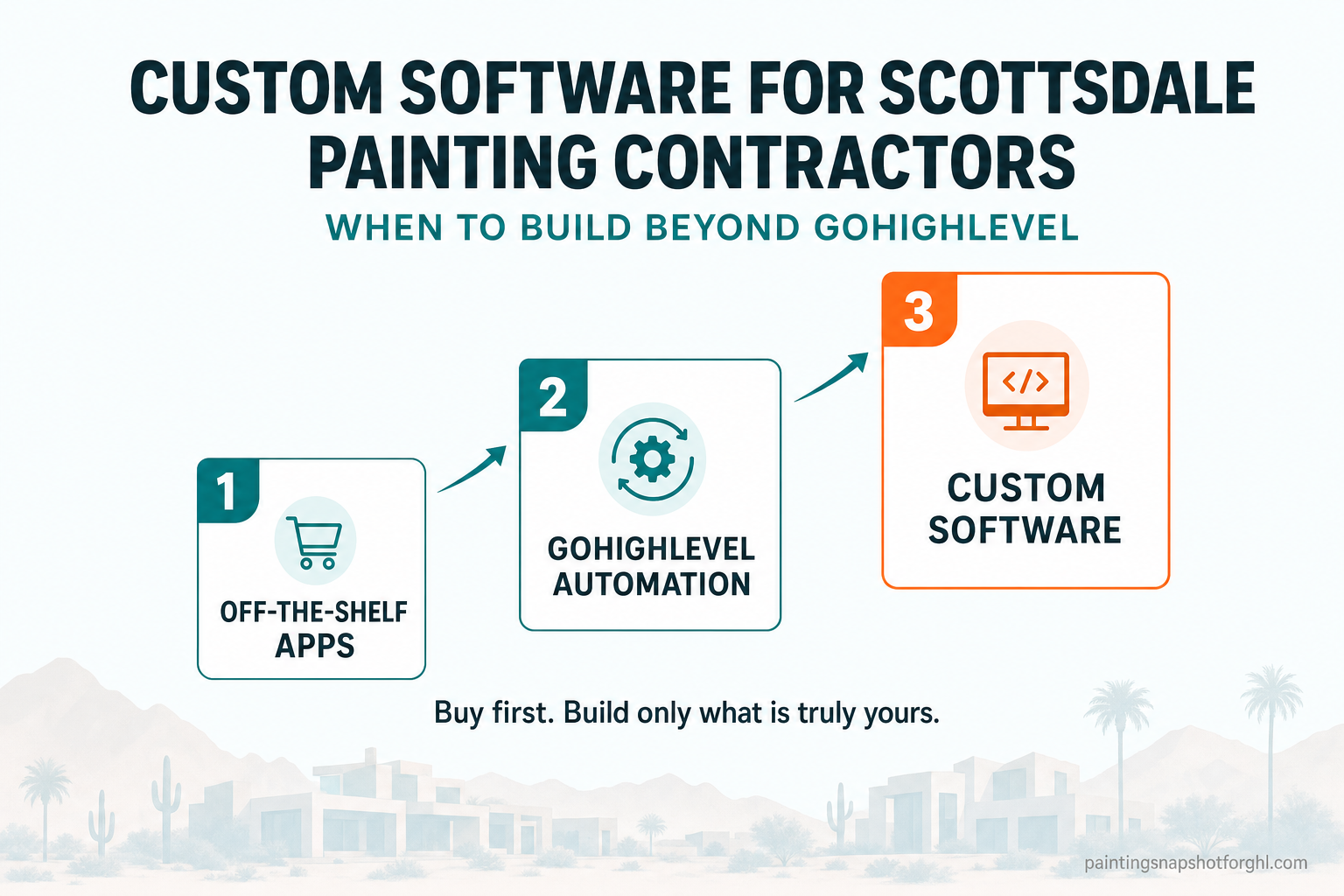
Most Scottsdale painting contractors don’t need custom software — right up until the day an off-the-shelf tool starts dictating how they run the business instead of the other way around. The signal is always the same: your estimator re-types the same job into three apps, homeowners call the office because they have nowhere to see their own estimate, and your “system” is really a stack of monthly subscriptions that don’t talk to each other. This guide is a practical, step-by-step way to decide when a painting company should stop buying more apps and start building software around its own process — what a GoHighLevel snapshot already covers, where custom software actually earns its keep, and how to scope a first build without gambling your budget.
In this post
- When a Scottsdale painting company outgrows off-the-shelf apps
- GoHighLevel first: where the snapshot ends and custom software begins
- The 5-step build-vs-buy decision
- 4 custom builds Scottsdale painters actually order
- What it costs and how long it takes
- Frequently asked questions
When a Scottsdale painting company outgrows off-the-shelf apps
Scottsdale is a repaint market where the numbers are on your side. The city holds a population of about 241,361 at the 2020 Census, estimated near 243,000 since, with roughly 67% of homes owner-occupied and a median home value around $789,800 in 2024 — about 2.4 times the US median of $332,700 (Data USA / U.S. Census American Community Survey). From the desert-contemporary homes around McCormick Ranch to the estates up in Troon North, those are large exteriors, high-end interiors, and cabinet jobs where a single project is worth what three jobs are worth in a cheaper market.
That’s the good news. The catch is what running those jobs looks like behind the scenes. Nationally, house painting is a $49.1 billion industry spread across about 219,542 contractor businesses (IBISWorld, 2026), employing roughly 342,200 painters (U.S. Bureau of Labor Statistics, 2024) — a deeply fragmented field where most shops run on the same tangle of consumer apps: a scheduling tool here, a spreadsheet estimate there, a texting app, a separate invoicing app, and email holding it all together.
Hours lost per worker per week to a disconnected tool stack. Sources: Harvard Business Review, 2022; Asana, 2021.
That tangle has a price, and it’s been measured. A Harvard Business Review study of everyday software use found people toggle between applications roughly 1,200 times a day, and that switching alone eats just under four hours a week — about 9% of the workday — spent re-orienting after each jump (Harvard Business Review, 2022). On top of that, Asana’s Anatomy of Work research put the cost of duplicated work — re-entering the same information into a second and third system — at about 6.5 hours a week per person (Asana, 2021). For a painting office, that’s your estimator typing the same customer into the CRM, the calendar, and the invoicing app, and your crew lead texting a schedule that already exists somewhere else.
None of that means you need custom software. Most of it is fixable by consolidating onto one platform — which is exactly what a done-for-you GoHighLevel snapshot does. Custom software matters only for the specific things a configured CRM genuinely can’t do. So the first question isn’t “what should I build?” It’s “what does the platform I already have not cover?”
GoHighLevel first: where the snapshot ends and custom software begins
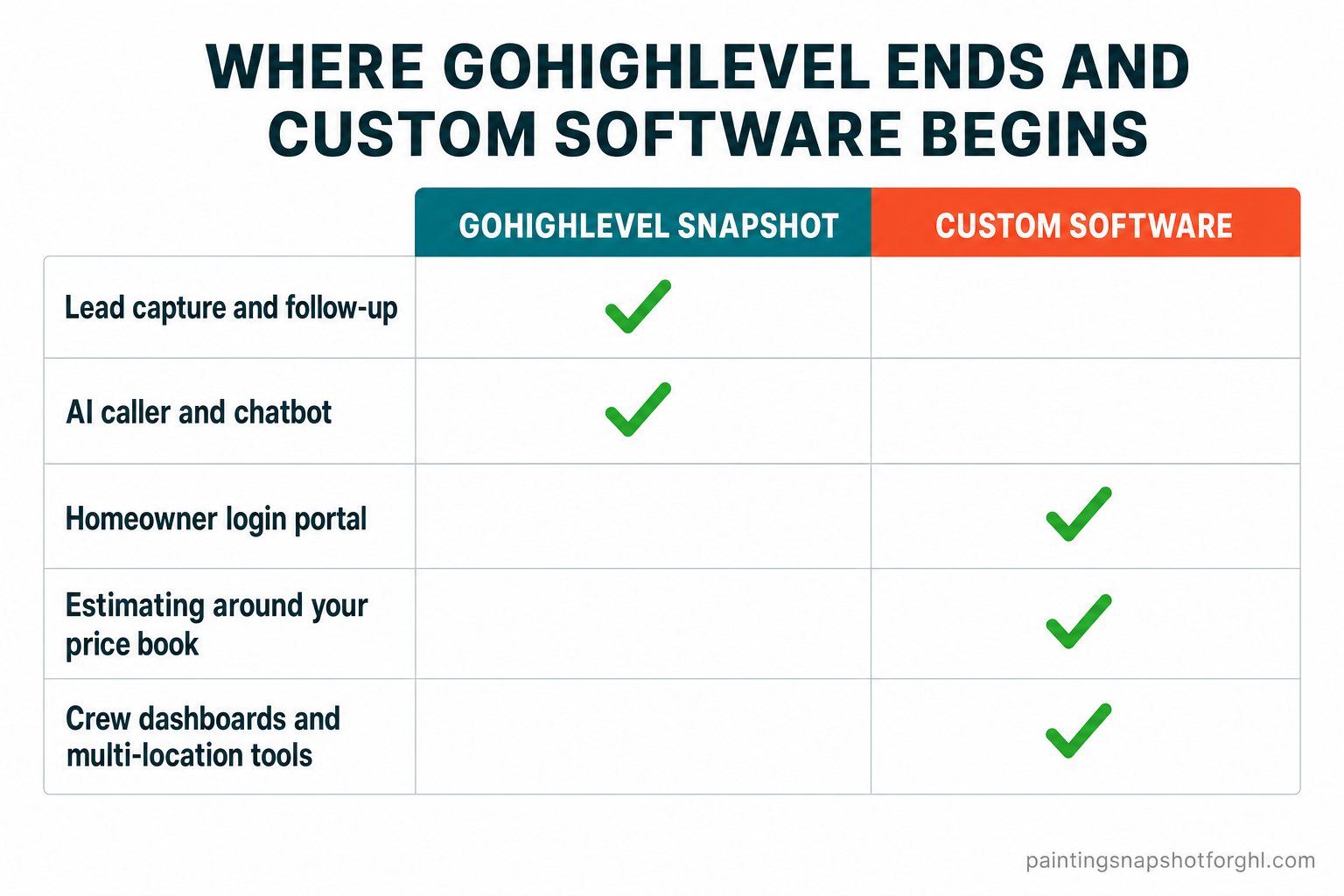
Here’s the honest version, from someone who maps painting back offices for a living: a well-built GoHighLevel snapshot solves 80% of what most painting shops call a “software problem.” It answers leads, follows up, books estimates, sends reminders, recovers no-shows, and harvests reviews — and it does the one thing that wins jobs, which is respond fast. That speed is not a nice-to-have. A web lead contacted within five minutes is about 21 times more likely to qualify than one reached at thirty (MIT / InsideSales Lead Response Management Study), yet the average company takes 42 hours to respond (Harvard Business Review, 2011). Automated follow-up closes that gap, and you do not need custom code to get it.
Custom software begins where the CRM’s guardrails do. GoHighLevel is a configuration platform: it’s superb at workflows, pipelines, and messaging, but it isn’t a place to build a homeowner-facing login area, an estimating engine that mirrors your exact price book, or a production dashboard your crews live in. When you need those, you’re no longer configuring — you’re building. That’s the line.
If your real issue is that your systems don’t talk to each other — the double-entry tax from the last section — that’s often an integration project, not a from-scratch build. We wrote a full breakdown of that for Pittsburgh painters wrestling with data silos, and if you’re still on legacy tools, moving the whole operation onto GoHighLevel first usually comes before any custom build.
The 5-step build-vs-buy decision
Before you commission a single line of code, run the workflow through these five steps. It’s the same triage I use when a painting company asks “should we build something for this?” — and most of the time, the honest answer at the end is “not yet,” which saves you real money.
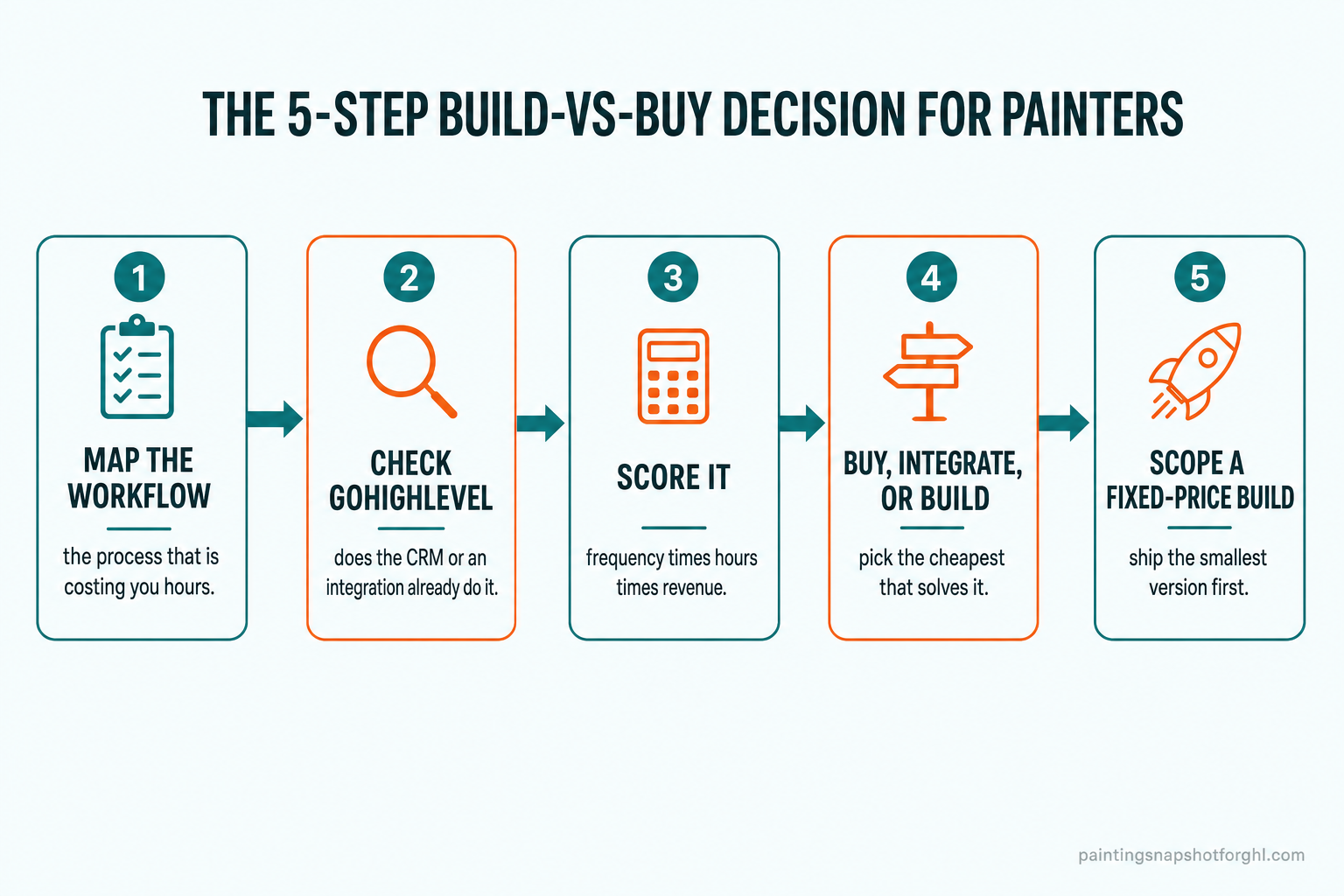
1. Map the workflow that’s actually costing you
Pick the one process that generates the most friction — not the flashiest idea, the most painful one. Write it down step by step, exactly as it happens today: who touches it, which app they open, what they re-type, and where it stalls. For most Scottsdale shops the winner is either the estimate journey (walkthrough → written quote → follow-up → approval → deposit) or job handoff (sold job → schedule → crew instructions → customer updates). Mapping it honestly usually exposes two or three manual steps that are the real cost — not the whole workflow.
2. Check whether GoHighLevel or an integration already does it
Now be ruthless about what your existing platform already covers. Reminders, review requests, missed-call text-back, pipeline stages, and automated follow-up are all standard snapshot features — if that’s your gap, you have a configuration project, not a build. Next, check integrations: tools like Zapier and Make can pass data between GoHighLevel and another app you already pay for, killing the double-entry without custom code. Only what survives both filters — the stuff the CRM can’t do and no integration bridges — is a genuine candidate to build.
3. Score it: frequency × hours × revenue
A workflow is worth building for only when it clears three bars at once. Frequency: does it happen on every job, or a few times a year? Hours: how much staff time does the manual version burn each week? Revenue impact: does fixing it win jobs, speed cash in, or free your best person to sell? A homeowner portal that touches every estimate, saves your office hours of status calls, and gets deposits paid faster scores high on all three. A one-off report you run each quarter does not. If a task is rare, cheap, or disconnected from revenue, the payback on custom software isn’t there yet.
4. Decide: buy, integrate, or build
With the score in hand, the decision is usually obvious:
- Buy — an off-the-shelf tool does it well and integrates cleanly. Keep your money.
- Integrate — the pieces exist but don’t talk; a connector or a small automation solves it.
- Build — the workflow is core to how you win work, no tool fits it, and it clears the frequency-hours-revenue bar. This is where custom software pays for itself.
The mistake is jumping straight to “build” because the current tools annoy you. Annoyance is a configuration or integration signal far more often than a build signal.
5. Scope a fixed-price minimum build
If it’s genuinely a build, don’t commission the dream system — commission the smallest version that removes the pain, at a fixed price you agreed up front. A first homeowner portal might do exactly three things: show the estimate, take an approval, and collect a deposit. Ship that, let it prove its value on real jobs, then add scheduling, photos, and messaging in a second phase. A written, fixed-price scope protects you from the open-ended dev bills that give custom software its scary reputation. On our custom software builds, every project starts with a written scope and a fixed quote, plus a 30-day bug-fix warranty — so you know the number before anyone writes code.
4 custom builds Scottsdale painters actually order
When a painting company does cross the build line, it’s almost always one of these four. Each one starts where GoHighLevel stops.
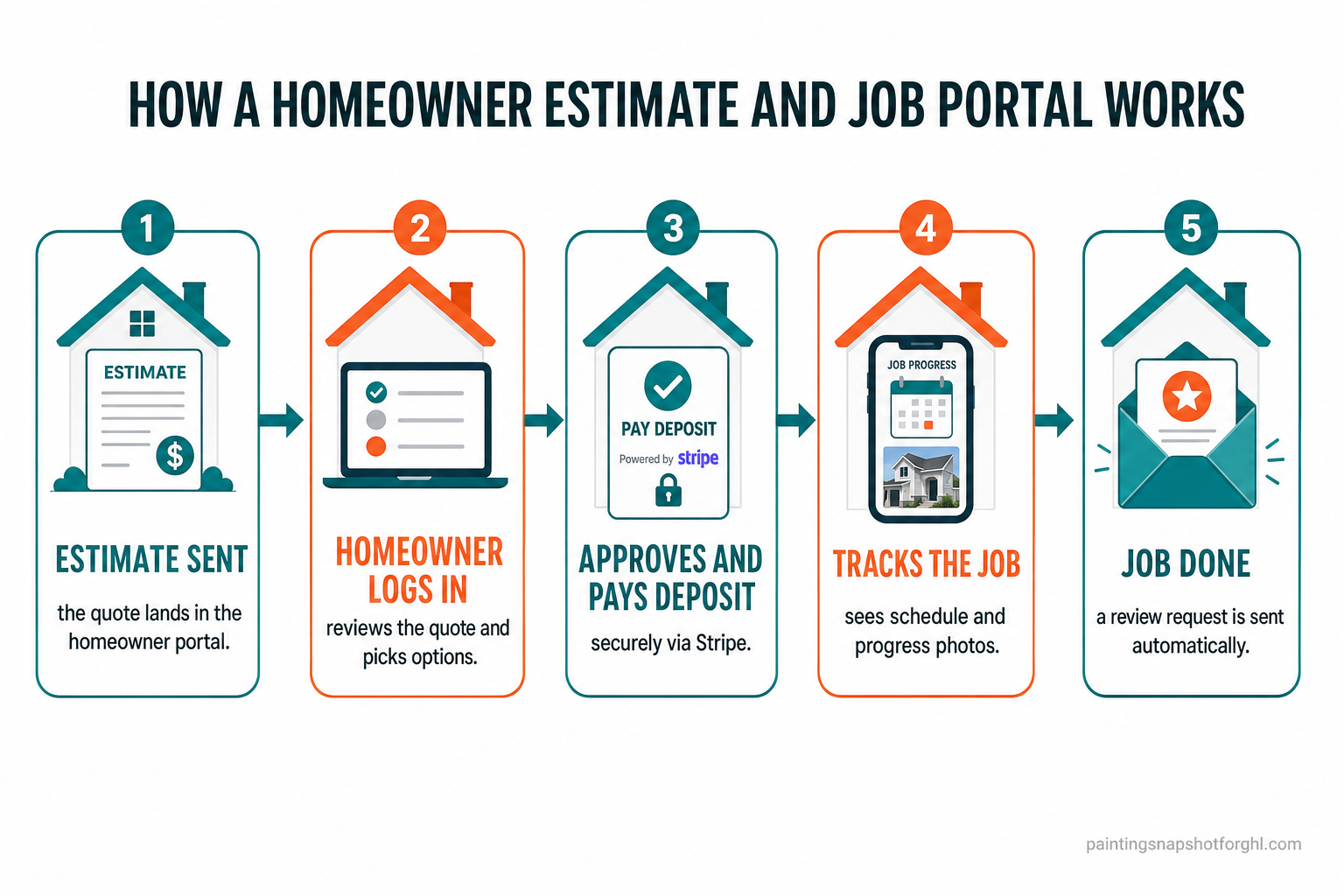
1. A homeowner estimate-and-job portal. This is the most-requested build, and it’s a direct answer to how buyers behave now: about 68% of customers would rather handle a simple task themselves than call someone (Salesforce). A branded portal lets a Scottsdale homeowner log in to review their estimate, pick options (two coats vs. three, trim in or out), approve the scope, pay a deposit through Stripe, then watch their schedule and progress photos as the job runs. It turns a dozen status calls into zero and makes a premium shop feel premium. Here’s the flow it replaces the phone tag with:
2. An estimating engine built around your price book. Generic estimate tools force your pricing into their boxes. A custom estimator encodes your rules — your per-square-foot rates, your prep multipliers, your minimums, the way you price a two-story exterior in Arizona heat versus an interior repaint — so any estimator on your team produces a quote that matches how the owner would price it. That’s consistency and margin protection, not just speed. We dug into why the price book is where off-the-shelf tools break down in the Charlotte custom-software guide.
3. Crew and production dashboards. Once you’re running multiple crews, the office needs a live view the CRM wasn’t built to show: which jobs are staged, which are in progress, which are waiting on materials or a customer decision, and who’s where today. A production dashboard — fed by the same data your snapshot already captures — gives the owner one screen instead of a group text and a whiteboard. If your pipeline is currently a mess of sticky notes, start with the CRM pipeline fix before adding a dashboard on top.
4. Integrations and AI agents. The quiet workhorses. A custom integration can sync your accounting, materials ordering, or a supplier’s catalog with your CRM so nobody re-keys anything. A trained AI agent can read incoming quote requests, pull the right details, and draft a response in your voice. These are lighter and faster to ship than a full portal, and they often deliver the fastest payback because they kill the exact double-entry the research above put a number on. For deeper platform work — custom plugins, HIPAA-ready builds, DevOps — that’s the domain of a full-stack GoHighLevel developer.
What it costs and how long it takes
The reason custom software feels risky is the fear of an open-ended bill. The fix is fixed-price scoping and a small first build. As a rough guide for painting-company work: a focused AI agent or integration lands in about 2–3 weeks, a homeowner portal in about 4–7 weeks, and a full CRM-and-estimating system in about 6–10 weeks — each on a written scope, at a fixed price, with a 30-day bug-fix warranty. If you’d rather not commit to a full project, ongoing development is available hourly at $75/hr with no minimums, so a small improvement stays small.
Whether custom software is worth it comes back to the market you’re in. In a place like Scottsdale — six-figure median incomes, $789,800 median home values, high-ticket exteriors and cabinet jobs — a tool that wins one extra premium job, or protects margin across every estimate, pays for itself quickly. The build-vs-buy discipline above is what keeps you on the right side of that math: buy and configure everything you can, integrate what you can bridge, and build only the few things that are truly yours.
Not sure whether your gap is a configuration fix, an integration, or a real build? That’s the most useful conversation to have first — our GoHighLevel development and custom software teams will tell you the smallest thing that solves it, even if that turns out to be no build at all. You can also compare plan pricing on the pricing page.
Frequently asked questions
Does a Scottsdale painting contractor really need custom software?
Usually not at first. For most painting shops, a done-for-you GoHighLevel snapshot already handles lead capture, follow-up, booking, reminders, and reviews. Custom software is worth it only for workflows a configured CRM can't reach — a homeowner login portal, an estimating engine built around your exact price book, crew dashboards, or a multi-location tool — and only when that workflow is frequent, costs real staff hours, and touches revenue.
What's the difference between GoHighLevel and custom software for painters?
GoHighLevel is a configuration platform: it's excellent at automations, pipelines, messaging, and speed-to-lead, all without code. Custom software is for things the CRM was never built to do — a customer-facing portal your homeowners log into, math that follows your own pricing rules, or data joined across systems that don't connect. A simple test: if a task can be solved by turning on a feature or adding an integration, keep it in GoHighLevel; if it needs a screen your customer logs into or logic unique to your business, that's a build.
What can a custom homeowner portal do for a painting company?
A branded portal lets homeowners log in to review their estimate, choose options, approve the scope, pay a deposit through Stripe, and follow their schedule and progress photos — cutting status calls to near zero. About 68% of customers now prefer self-service for simple tasks (Salesforce), so a portal both meets that expectation and frees your office from repetitive phone updates. It's the most-requested custom build for painting contractors, and it typically ships in about 4–7 weeks.
How much does custom software for a painting business cost?
It's scoped per project at a fixed price, so you know the number before any code is written. As a guide, a focused AI agent or integration runs about 2–3 weeks, a homeowner portal about 4–7 weeks, and a full CRM-and-estimating system about 6–10 weeks — each with a 30-day bug-fix warranty. Ongoing or smaller development work is also available hourly at $75/hr with no minimums. The best first move is a scoping call for a written, fixed-price quote.
How do I avoid overpaying for custom software?
Run every idea through a build-vs-buy filter first. Map the workflow, check whether GoHighLevel or an integration already handles it, and score it on frequency, hours saved, and revenue impact. Buy off-the-shelf where you can, integrate what already exists, and build only the few workflows that are truly core to how you win work. Then scope a minimum first version at a fixed price rather than the whole dream system — ship it, prove it, and expand in phases.
We run multiple crews around Scottsdale — what should we build first?
Start with whatever removes the most daily friction, which for multi-crew shops is usually a production dashboard or a homeowner portal. A dashboard gives the office one live view of every job's stage instead of a group text and a whiteboard; a portal cuts the status calls that pile up when several jobs run at once. Both are fed by the data your GoHighLevel snapshot already captures, so they extend the system you have rather than replacing it.
Written by Travis Bergeron, Operations & Workflow Consultant at Painting Snapshot. Travis is a recovering project manager who ran scheduling for a commercial and HOA painting outfit before moving into systems consulting. He maps the messy real-world back office of a painting business into clean GoHighLevel workflows — and knows exactly where a configured CRM stops and custom software has to begin. He writes about the unglamorous systems that quietly save a painting shop the most money.
Related posts
- Custom Software for Charlotte Painting Contractors: The Hidden Cost of Off-the-Shelf Apps
- GoHighLevel Integrations for Pittsburgh Painting Contractors: Killing Data Silos
- Migrating a Painting Business to GoHighLevel (Chicago)
- Fixing the Messy Painting Pipeline in Sacramento
- The Real Cost of Running GoHighLevel Yourself (Orlando)